Deals and inquiries
A deal (or inquiry) is a specific customer process that you drive toward a result: a sale, a service request, a legal case, a recruiting search. The deal card gathers the client, the owner, the amount or value, the due date, the next step, tasks, documents, and history all in one place. When deals are run honestly, the manager sees the real picture of the pipeline rather than a tidy-looking board.
Deals live in the Deals and inquiries section (/crm/opportunities; /crm leads here as well).
Two board views
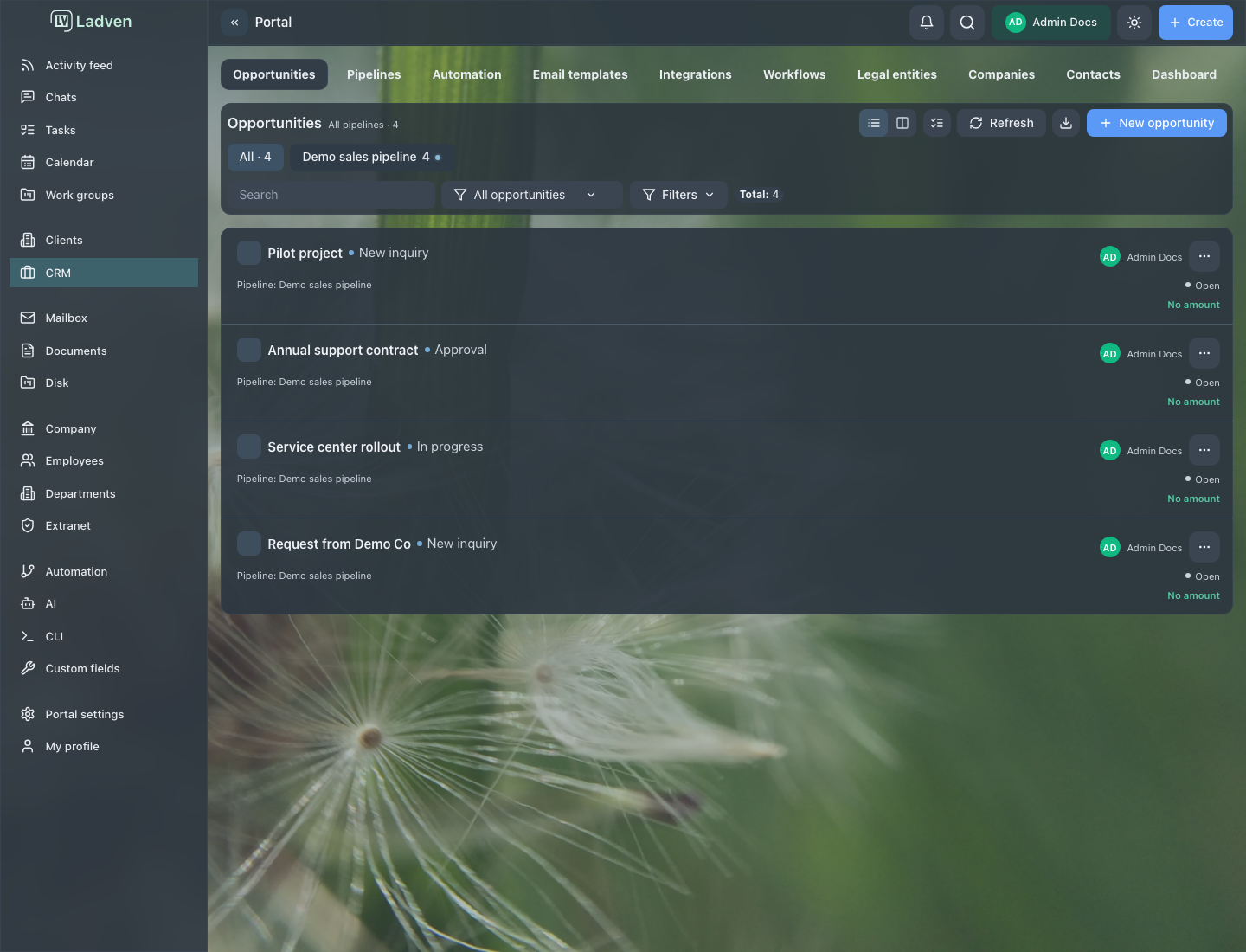
You can work with deals in two modes:
- List - a table of deals with columns (name, client, pipeline, stage, amount, source, contacts, links). Good for control, search, and bulk actions, including across all pipelines at once.
- Kanban - columns by the stages of the selected pipeline. Kanban is available when a specific pipeline is selected; for the "all pipelines" mode the system switches to the list. Good for seeing the flow of work and bottlenecks.
The chosen view is saved per pipeline, so you can look at each process in the most convenient form.
How to find the deals you need
The top panel offers search and filters:
- search by deal name and data;
- filter by owner, pipeline, stage, status, source, and type;
- quick filters: all, mine, open, overdue, due today, upcoming, unread, and a saved custom slice.
A separate attention filter gathers the deals that need action: those that require a reaction, overdue, due today, upcoming, unread. You can view it across "All" (the whole team) or "Mine." This is a working tool for the manager and the operator: start the day not by scrolling through the whole board, but with what actually needs attention.
What the deal card shows
On the board and in the list, the essentials of a deal are visible:
- the deal name;
- the client, company, and contact, sometimes with a decision-maker marker;
- the deal owner;
- the amount or value and the probability;
- the stage and pipeline;
- the expected close date and the next step;
- attention and priority markers: overdue, due today, unread.
In Kanban columns there is also a per-stage summary: the number of deals and the total amount. This immediately shows where work is piling up.
How to create a deal
Creation opens with the new deal button. The form has two parts:
- on the left - the fields defined by the pipeline: the set of fields depends on the process, so the form looks different across pipelines;
- on the right - the readiness panel: it shows the "Ready," "Draft," or "Blocked" state and lists which required fields are missing.
The order:
- Choose the right pipeline - it determines the set of fields and stages.
- Fill in the required fields; use the readiness panel so you do not miss anything.
- Specify the client, contact, owner, amount or value, expected due date, and next step.
- Save the deal. You can save and open it right away, or save and create the next one.
Links and correspondence can be added after creation: they become available once the deal already exists.
How to run a deal through its stages
The stage must reflect the actual state of the work, not a wish to tidy up the board. Do not move a deal forward just because it looks neater that way.
Deal fields fall into system fields (name, amount, currency, owner, client, legal entity, stage, pipeline, status, probability, next step, expected close, source) and the fields a pipeline added for its own process.
After every significant event, update the stage and the next step and leave a clear comment. A deal without a next step is a signal that the work may stall.
Closing a deal with an outcome
When a deal reaches its final stage, the system asks you to record the outcome: Won, Lost, or another result. This is not a formality but data for pipeline analysis.
- The final stage may require a closing reason - without it, the transition will not go through. State the real reason, not the first one at hand: it is from these reasons that you later see the true conversion rate and the typical losses.
- After closing, a deal may become read-only. This protects the record of the result from accidental changes.
The deal card at work
An open deal is a workspace, not just a record. The card brings together tabs for everything related to the deal:
- Deal - fields, stage, amount, participants, the next step;
- Tasks - tasks for the deal, with the option to set a new one from context;
- Files - the deal's materials;
- Documents - contracts, invoices, and other documents;
- Calendar - meetings and events for the deal.
From the card you can reach an actions menu: set a task, add a reminder, create a workgroup or a client project, send an email to the client, run a robot rule. This lets you carry out work on the deal without leaving for other modules.
The activity feed and history show what happened with the deal: stage changes, new tasks, emails, comments. Use the feed as a trail of agreements: a decision should be visible in the card, not only in private correspondence.
Amount, value, and probability
A deal carries not only a name but also measurable indicators:
- amount or value - how much the result is worth; several currencies are supported, so check that the right one is set;
- probability - an estimate of the chance of success; it helps build the pipeline forecast;
- expected close date - when the result is planned;
- next step - exactly what to do next.
These indicators are not for show but for forecasting: from them a manager sees how much money is really in progress and which deals need attention. Do not leave amount and probability as rough guesses if a plan is built on them.
Related deals
Deals can be linked to one another: as parent and child, or simply as related. This helps you avoid losing context when one deal grows into several directions, or when a large piece of work is split into parts.
Link deals deliberately: a link should help you understand a dependency or a continuation of work, not just lengthen a list. If a deal has produced a standalone result, create a child or related deal rather than blurring the original one.
Bulk actions
In the list you can select several deals and apply the same action, for example archiving. If the action did not apply to all of them (a partial result), handle the remaining ones separately rather than repeating the bulk operation blindly: some deals may have failed because of permissions, status, or a protective check.
Manager control
Regularly check, via the board and the attention filter:
- deals without a next step;
- stuck stages where work has stopped;
- deals without an owner;
- overdue deals and customer tasks;
- deals closed without a clear reason.
If the board stops reflecting reality, fix the process and the data first, not the report. The board is useful exactly as far as it can be trusted.
States you may see
- access to the module or the deal is denied by permissions;
- the board or list is empty, or Kanban requires you to select a pipeline first;
- a deal in a final or protected stage is read-only;
- a transition between stages is blocked by a protective check with a clear message - meet the condition and retry;
- completion requires an outcome and a closing reason;
- a bulk action completed partially;
- an export is running or has failed.
Good practices
- Create the deal in the right pipeline; it determines the fields and stages.
- Before saving, check the readiness panel and the required fields.
- Every deal should have an owner and a next step.
- Move a stage only after a real change in the state of the work.
- When closing, record an honest outcome and reason.
- Begin control with the attention filter, not by scrolling through the whole board.
Common mistakes
Moving a deal through stages just to keep the board tidy. The board stops reflecting the real work, and the forecast becomes false.
Leaving a deal without a next step. The work quietly stops, and no one notices in time.
Closing a deal without a reason. The team loses the data on why it lost and never learns from it.
Running several processes in one pipeline. The stages become unclear, and the CRM turns into an arbitrary list.
Repeating a bulk action blindly after a partial result. Some deals will fail again, and the cause will remain unexamined.
How to verify the result
- the deal is created in the right pipeline, with the required fields filled in;
- the client, owner, amount, due date, and next step are visible;
- the stage matches the real state of the work;
- a closed deal has an outcome and a reason;
- the attention filter shows no forgotten overdue deals left without action.