Client portal for document approval
This page is about a real work task: approving contracts and documents with an external client so you don't email versions back and forth, don't lose edits, and can see what stage the approval is at. Below is how this comes together in LadVen OS through a client portal (extranet).
What problem it solves
When documents are approved over email, version chaos sets in: "final_2_edits.docx", edits scattered across different messages, lost comments, and no clarity about whose turn it is. The client can't see the full picture, and the company wastes time gathering scattered responses.
The scenario closes this as follows: the document is posted to a secure client portal, the client sees the current version, leaves comments in one place, and the company sees the approval status and who said what.

Conceptual guidance; not a UI screenshot or evidence.
How it works in LadVen OS
The scenario comes together from blocks that already work together:
- Extranet — an external portal the client is invited to via a secure link.
- Documents and files — current versions are available to the client without emailing them.
- Discussion — comments and agreements are recorded right next to the document.
- Link to the client and the deal — the approval is tied to the client card in CRM.
- Access by invitation — the client sees only what has been opened to them.
- Status control — you can see what stage the approval is at and whose turn it is.

Conceptual guidance; not a UI screenshot or evidence.
What the client sees in the portal
The client enters the portal by invitation and sees only the documents and discussions relevant to them — without access to the company's internal database. They don't need an account in the main portal: they work in a limited external space that holds the necessary files and the correspondence about them.
Conceptual guidance; not a UI screenshot or evidence.
Approval and discussion
Comments and agreements about a document stay right next to it instead of getting lost in email. The company sees who said what and what stage the approval is at. When a document is updated, the client sees the current version — without "here's the final edit" emails.
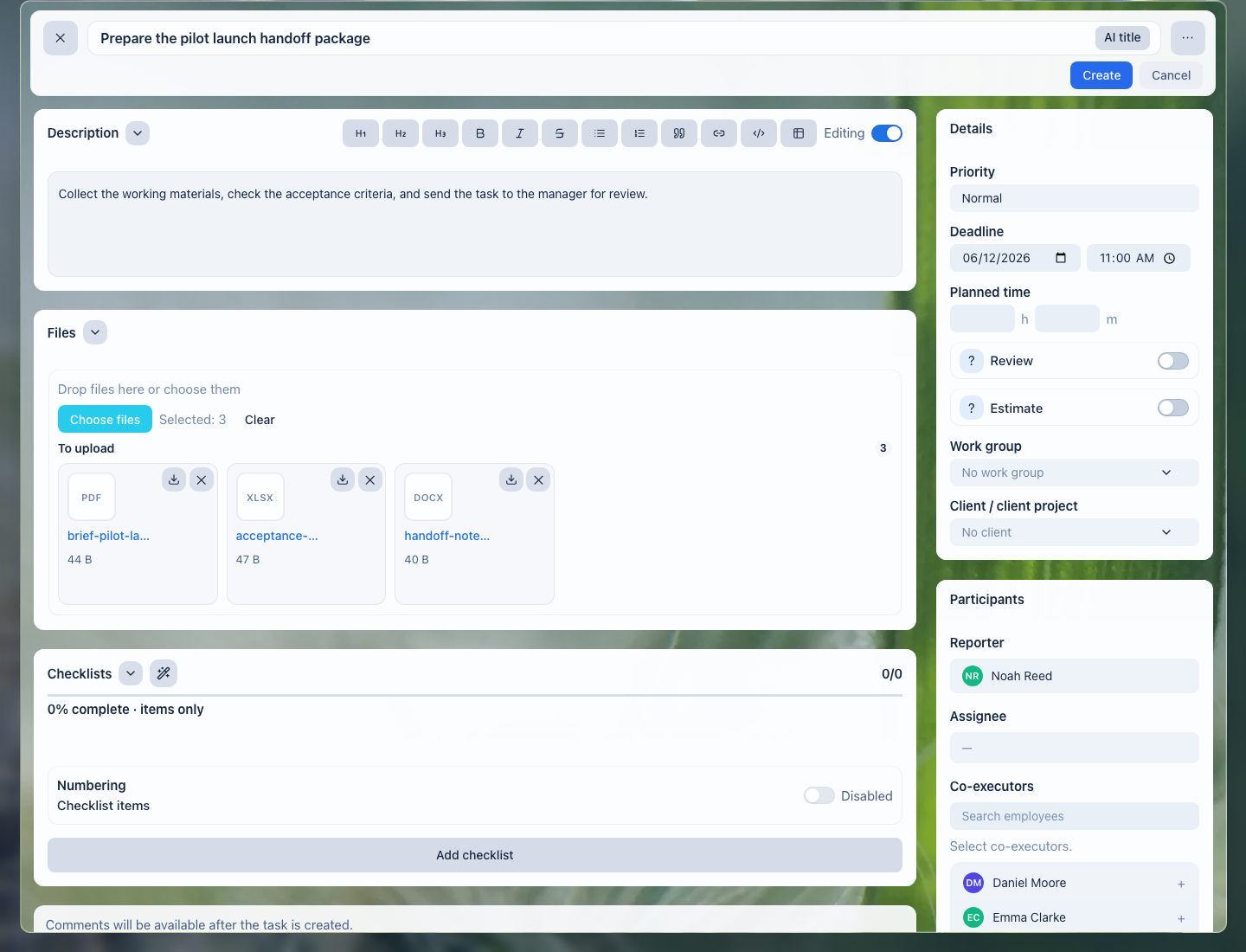
Task files keep the current document version, comments, and approval result in one working place.
Important: the portal is for shared access to documents, discussion, and approval. E-signature and the exchange of legally significant documents through EDI/EDM are separate capabilities; do not consider them part of this scenario unless they are separately enabled and confirmed.
Access and security
Access to the client portal is granted by invitation and limited by permissions: the client sees only the documents and discussions opened to them. This lets you work with external people without opening your company's internal database to them.

Conceptual guidance; not a UI screenshot or evidence.
What the company gets
- one current version of the document instead of email chaos;
- comments and agreements gathered next to the document;
- visibility into what stage the approval is at and whose turn it is;
- the client works in a limited portal, without access to the internal database.

Conceptual guidance; not a UI screenshot or evidence.
Implementation checklist
- Create an external space and invite the client via a secure link.
- Publish the current document versions so nothing is emailed back and forth.
- Agree where comments and decisions are recorded — next to the document.
- Link the approval to the client record and deal in the CRM.
- Give the client access only to what they need to see.
- Set up status tracking: what stage the approval is at and whose turn it is.
Conceptual guidance; not a UI screenshot or evidence.
What to avoid
- Don't email document versions around — the client should see the current version in the portal.
- Don't open more than needed to the client: only what must be approved.
- Don't record comments in private messages — keep them next to the document.
- Don't lose the approval status: it should always be clear what stage it's at and whose turn it is.

Conceptual guidance; not a UI screenshot or evidence.
How to measure the result
- the average time to approve a document with a client;
- the number of revision rounds before the final version;
- the share of approvals without version confusion or lost comments;
- the share of documents approved through the portal rather than by email.

Conceptual guidance; not a UI screenshot or evidence.
Where to start
- Extranet — an external portal for clients and partners.
- Documents — storing and sharing documents.
- Clients — client records the approval is tied to.
- Client workspace — documents and discussions per client.
- Task Fields and Work Context — record the approval status, client, document, and current turn.
- Add a Checklist — split approval into review stages and required conditions.
- Attach Files to a Task — keep the current version, comments, and final file next to the work.
- Review and Close a Task — accept the approval result without losing new edits or obligations.

Conceptual guidance; not a UI screenshot or evidence.
Request a demo
Want to see how document approval runs through a client portal on a ready demo stand? Request a demo — we'll show the configured scenario and help you move your client work onto it.
Conceptual guidance; not a UI screenshot or evidence.