When your team has outgrown scattered tools
This page is about the moment when there are too many spreadsheets, chats, and separate services: data gets duplicated, context is lost, and the manager has to piece the picture together by hand. Below is how to bring your team's work together in one place with LadVen OS.
What problem it solves

Conceptual scenario flow: process guidance, not a UI screenshot or screenshot evidence.
While the team is small, spreadsheets and chats work. As it grows, they stop: the same clients live in three places, tasks get lost between messengers, documents move by email, and to understand what is going on you have to poll half the team. The more tools there are, the more time goes into syncing them by hand.
This scenario solves it like this: tasks, clients, deals, documents, and correspondence live in one system, are linked to each other, and every element has an owner and a history.
How it works in LadVen OS

Conceptual scenario flow: process guidance, not a UI screenshot or screenshot evidence.
LadVen OS is an operating system for teamwork, where the building blocks are already connected:
- Tasks — assignment, execution, and control in one place.
- CRM — clients and deals with stages and owners.
- Documents — contracts and files linked to the client and the deal.
- Communications — inquiries and correspondence in a shared context.
- Automation — the system handles routine steps, not people by hand.
- Control — the manager sees the overall picture without manual reports.
What's in the demo

Conceptual scenario flow: process guidance, not a UI screenshot or screenshot evidence.
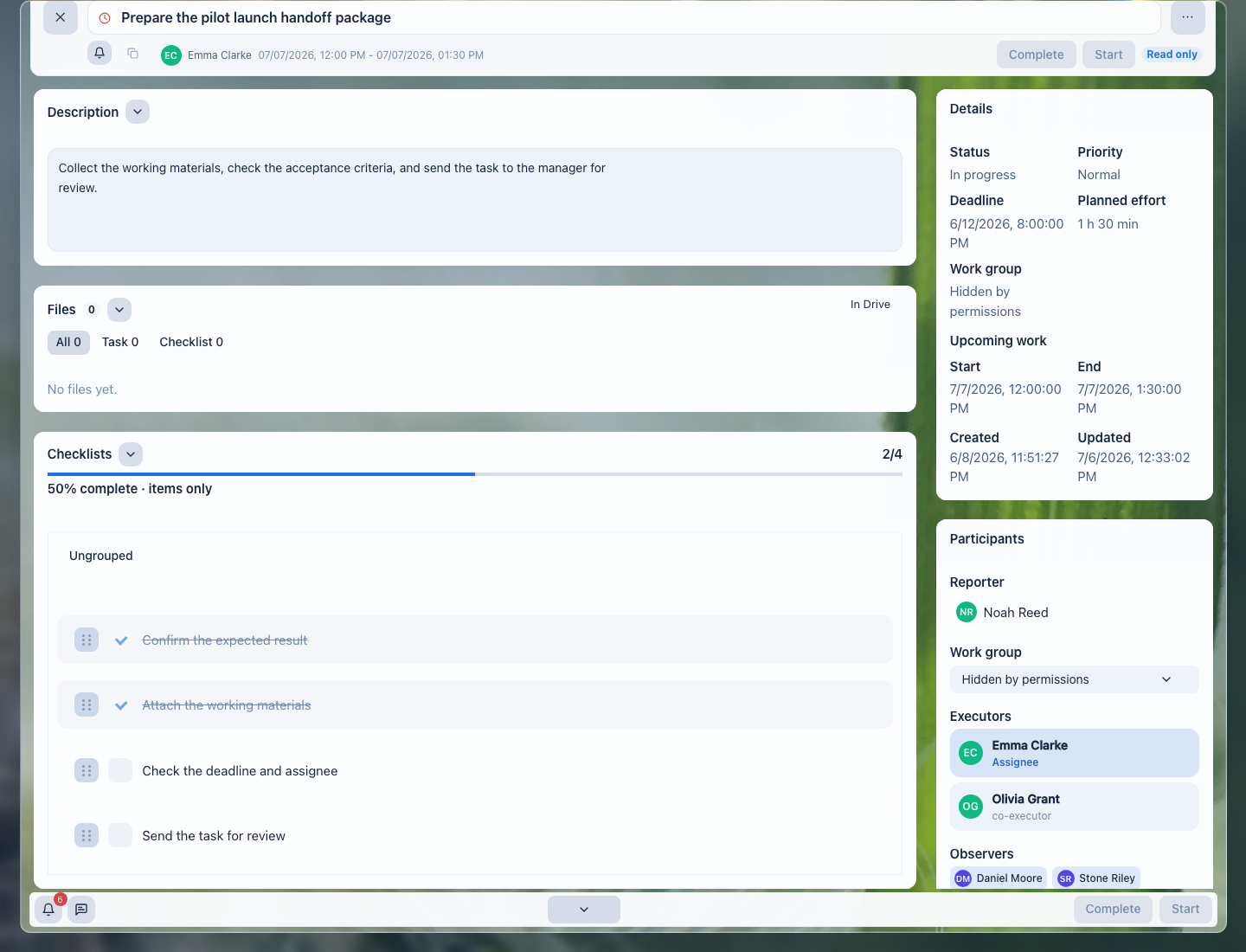
The demo setup contains a "Demo sales" pipeline with deals, tasks, and owners — an example of how scattered work comes together into one system. The accepted public image on this page proves the task-context part of that system; broader CRM board and dashboard screenshots remain a separate capture target.
Everything in one place
On the deals board you can see the work across clients and deals in one place: stages, owners, the next step. There is no need to reconcile spreadsheets or keep asking around in chats — the picture is single and up to date for the whole team.
Control instead of scattered reports

Conceptual scenario flow: process guidance, not a UI screenshot or screenshot evidence.
The dashboard brings the picture of the process together: what is in progress, where the money is, what is stuck, and which tasks are due today. The manager sees the state of things at once, rather than assembling it by hand from different sources.
What the team gets

Conceptual scenario flow: process guidance, not a UI screenshot or screenshot evidence.
- one up-to-date picture instead of data in three places;
- every task, deal, and document has an owner and a history;
- less manual syncing between tools;
- the manager sees the state of things without manual reports.
Implementation checklist

Conceptual scenario flow: process guidance, not a UI screenshot or screenshot evidence.
- Gather the team's tasks into one list with assignees and deadlines.
- Move clients and deals into the CRM with stages and owners.
- Attach documents and files to the client and deal, instead of email and drives.
- Bring inquiries and correspondence into one shared context.
- Hand routine steps to automation instead of manual work.
- Set up the dashboard and controls so the manager sees the picture without manual reports.
What to avoid

Conceptual scenario flow: process guidance, not a UI screenshot or screenshot evidence.
- Don't migrate the chaos as-is: agree on the process first, then configure the tool.
- Don't keep part of the work in the old tools "in parallel" — that brings the fragmentation right back.
- Don't automate a broken process — fix it first, then automate.
- Don't skip agreeing on shared rules with the team: a tool works when everyone uses it the same way.
How to measure the result
Conceptual scenario flow: process guidance, not a UI screenshot or screenshot evidence.
- the share of workflows kept in one place rather than scattered across tools;
- the time it takes to put together a report or a project status;
- the number of "lost" tasks and agreements with no owner;
- how fast a new employee gets onboarded.
Where to start
Conceptual scenario flow: process guidance, not a UI screenshot or screenshot evidence.
- Tasks — assigning, executing, and controlling work.
- Task lists and saved views — control work by owner, deadline, and priority.
- Create a task — turn an agreement into work with an owner, deadline, and context.
- Task context — keep the source, client, files, and agreements in one card.
- Task participants — keep work from having no owner or observers.
- Task templates and automation — standardize repeatable work.
- CRM — clients, deals, and the pipeline.
- Documents — contracts and files linked to the work.
- Automation — what you can hand off to the system.
- Manager control and dashboard — the overall picture without manual reports.
Request a demo
Conceptual scenario flow: process guidance, not a UI screenshot or screenshot evidence.
Want to see how scattered work comes together into one system on a ready-made demo portal? Request a demo — we will show you a configured stand and help you move your processes onto it.