Sales pipeline with tasks and documents
This page is about a specific work problem: running sales so that every deal keeps its next step, owner, documents, and conversations in one place, while the manager can see at any moment where the money is and what is stuck. Below is how this comes together in LadVen OS from ready-made building blocks and what the team will see.
What problem it solves

Conceptual guidance for this section; this is not a UI screenshot or evidence of portal state.
When deals live in a spreadsheet while tasks and documents sit somewhere else, the most important thing gets lost: who has to do what next on a specific deal, and which stage it is at. Sales reps forget to call back, documents get hunted down in email, and the manager learns about a problem only after the deal has already gone cold.
This scenario closes that gap: every deal moves through a clear pipeline, always has an owner and a next step, and its related tasks and documents open straight from the deal card.
How it works in LadVen OS

Conceptual guidance for this section; this is not a UI screenshot or evidence of portal state.
The scenario is assembled from blocks that already work together:
- Sales pipeline — stages from the first inquiry to the win, with required fields and checks at transitions.
- Deals — a card with owner, amount, due date, and next step; a board as a list or a kanban.
- Tasks — for each deal you set tasks (call, prepare a quote, get the contract approved) with an assignee and a due date.
- Documents — invoices, contracts, and quotes are stored together with the deal, not in email.
- Automation — a robot can assign the owner itself, create a task when the deal enters a stage, and send a templated email.
- Control — the dashboard and the "attention" filter show the manager what is overdue and which deals have no next step.
What is in the demo

Conceptual guidance for this section; this is not a UI screenshot or evidence of portal state.
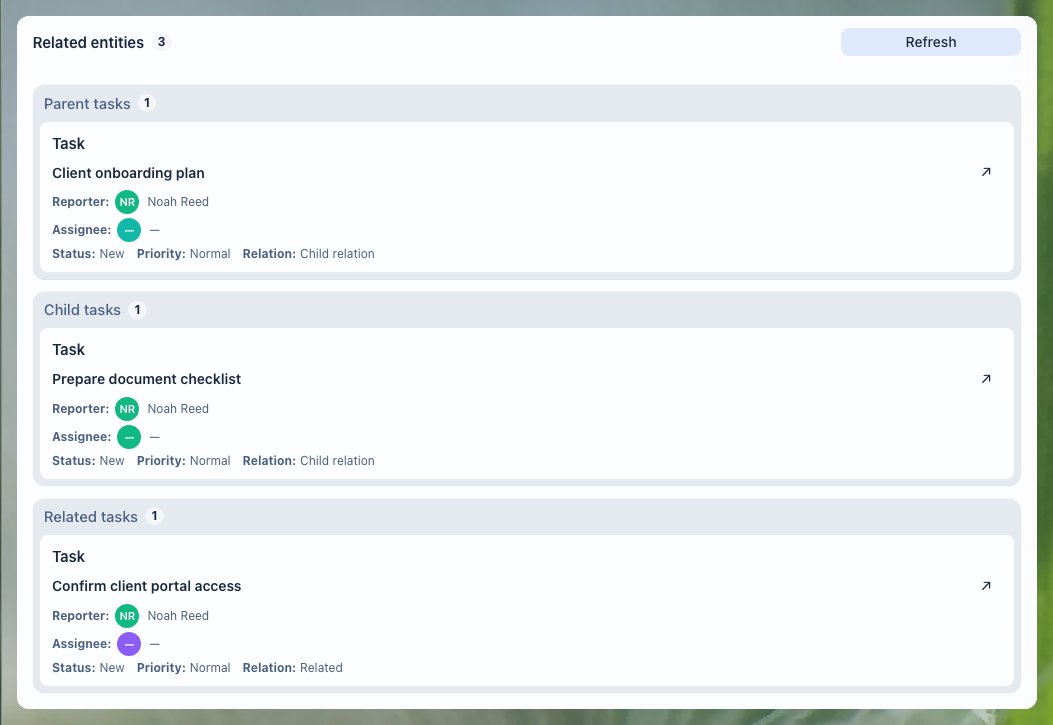
The demo setup for this scenario contains a ready-made "Demo sales" pipeline with stages, several deals across different stages, and deals with owners, amounts, and a next step. The accepted public image on this page currently proves the task-link context around that work; the full CRM board and dashboard screenshots remain a separate capture target.
Deals board
The deals board shows the whole pipeline: deals by stage, owners, amounts, and where a deal has stalled. A rep runs their own deals, moves them through the stages, and keeps the next step in place; the manager sees the overall picture.
Control and metrics

Conceptual guidance for this section; this is not a UI screenshot or evidence of portal state.
The dashboard brings the process picture together: the amount of deals in progress, conversion, tasks due today, and deals by stage. This is the manager's workspace — from here you can see what is going to plan and what needs intervention.
How it looks in practice

Conceptual guidance for this section; this is not a UI screenshot or evidence of portal state.
An inquiry comes in from the website. It used to land in one rep's inbox, and from there everything depended on their memory. Now a robot creates the deal in the "Demo sales" pipeline itself, assigns an owner, and sets the first task — "call and qualify" — due today.
The rep runs the deal through the stages: at qualification they attach a brief, before the "Contract" stage the system won't let them move on without an amount and a contact, and the quote and the invoice sit right in the deal card — not in email. At every stage the next step is visible, so the deal doesn't quietly go cold. When needed, the robot sends the client a templated email.
Meanwhile the manager looks not at individual deals but at the dashboard: the amount in progress, conversion by stage, deals with no next step, and overdue ones — all highlighted. They step in where a deal has stalled instead of calling around to the reps. When a deal closes, its tasks, documents, and conversations stay in the history, and the whole path is visible during a review.
What the manager gets
Conceptual guidance for this section; this is not a UI screenshot or evidence of portal state.
- every deal has an owner and a next step — nothing is left hanging;
- tasks and documents are tied to the deal, not scattered across email and chats;
- you can see where the money is in the process and what is stuck, without manual reports;
- repetitive actions (assign, create a task, send an email) are handled by automation.
Implementation checklist

Conceptual guidance for this section; this is not a UI screenshot or evidence of portal state.
- Create a sales pipeline with stages that fit your process: for example, new inquiry → qualification → proposal → contract → won.
- Mark required fields and checks on key transitions — for example, amount and contact before the "Contract" stage.
- Set up the standard tasks per deal: first contact, send the proposal, approve the contract — each with an assignee and a deadline.
- Configure a robot: when a deal enters a stage, create the right task and, if needed, send a templated email.
- Link documents to the deal: decide where proposals, invoices and contracts live.
- Check the dashboard and the "attention" filter: are deals without a next step and overdue deals visible.
What to avoid

Conceptual guidance for this section; this is not a UI screenshot or evidence of portal state.
- Don't turn pipeline stages into "folders": a stage should mean a real change in how the deal is handled, not just a checkbox status.
- Don't leave deals without an owner and a next step — those are the ones that quietly stall.
- Don't keep proposals, invoices, and contracts in email: without a link to the deal, you won't find them later.
- Don't pile on required fields — put checks only on the key transitions, or reps will work around them.
How to measure the result
Conceptual guidance for this section; this is not a UI screenshot or evidence of portal state.
- conversion at each pipeline stage and overall win conversion;
- average deal cycle — how long it takes from first contact to closing;
- the share of deals without a next step and overdue deals — it should go down;
- the value of deals in progress and the forecast for the period.
Where to start

Conceptual guidance for this section; this is not a UI screenshot or evidence of portal state.
- Deals and pipeline — the board, the deal card, creating and closing.
- Pipelines — stages, required fields, and checks at transitions.
- Tasks — setting, running, and controlling tasks on a deal.
- Task lists and saved views — controlling work by stage, deadline, and owner.
- Task relations — linking tasks to the deal, client, project, and documents.
- Task files — proposals, invoices, and contracts as evidence of the result.
- Documents — storing contracts and invoices together with the deal.
- CRM robots — automating assignments, tasks, and emails.
- Manager control and dashboard — regular control of the process.
Request a demo
Conceptual guidance for this section; this is not a UI screenshot or evidence of portal state.
Want to see this scenario on a ready demo portal with this pipeline, deals, and tasks? Request a demo — we will show a stand configured for sales and help move your process onto it.