CRM for a law firm
This page is about a law firm's working challenge: managing clients and matters so that every matter clearly shows its status, the responsible lawyer, upcoming deadlines, and all documents, while the partner sees workload and risks. Below is how this comes together in LadVen OS.
LadVen OS does not replace court registers, procedural systems, qualified legal expertise, or legally significant e-signature. It keeps the operational matter loop in order: client intake, documents, tasks, deadlines, owners, comments, and leadership control.
Want to see it working? Request a demo — we will show you a portal set up for a law firm: matters, deadlines, documents.
What problem it solves

This conceptual map highlights matter risks; it is not a UI screenshot or portal-state evidence.
In legal work, the cost of a mistake is a missed deadline and a lost document. When matters live in spreadsheets while correspondence and files are scattered across email, it's easy to miss a hearing, forget about a renewal, or fail to find the right version of a contract. The partner doesn't see the lawyers' real workload and learns about a problem too late.
This scenario closes that gap: every matter is managed as a record with stages, a responsible lawyer, and deadlines, documents and tasks are linked to the matter, and access to sensitive data is governed by permissions.
How it works in LadVen OS

This conceptual flow shows matter stage transitions; it is not a UI screenshot or portal-state evidence.
The scenario is built from blocks that already work together:
- Clients — individuals and companies as single records with history.
- Matters as work records — the workflow moves a matter through stages (intake, preparation, handling, closure) with a responsible lawyer.
- Deadlines and tasks — hearings, renewals, and document preparation as tasks with an assignee and a date.
- Documents — contracts, claims, and supporting files linked to the matter.
- Permission-based access — sensitive data is visible only to those who should see it.
- Oversight — the partner sees workload, deadlines, and matters with no movement.
Incoming request and matter route

This conceptual flow shows how an intake request becomes a matter; it is not a UI screenshot or portal-state evidence.
A legal matter should quickly turn from a call, email, or form into a clear work route: client, request type, stage, responsible lawyer, nearest deadline, required documents, and next step. If the request stays only in an assistant's inbox or in a lawyer's private chat, leadership does not see the risk and substitution becomes unsafe.
Different practices can follow different routes: consultation, contract work, claim handling, litigation, or a corporate request. But every route should show the owner, deadline, document package, current waiting state from the client or team, and the criterion for closing the stage.
Roles, deadlines, and procedural discipline

This conceptual flow separates responsibilities; it is not a UI screenshot or portal-state evidence.
A law firm needs to separate the lawyer's professional decision from operational control. An assistant can collect documents, a lawyer prepares a position or document, the partner controls risk and workload, and the client provides source data and accepts the operational result. One person may combine roles, but responsibility at each step should be explicit.
Deadlines are safer as tasks with an owner, date, and verifiable result rather than as one shared note: prepare a draft, request a document, check a version, send a package, receive the client's answer. If a deadline depends on the court, counterparty, or client, the task should show the waiting source rather than look like normal work in progress.
Templates, automation, and partner control

This conceptual flow shows a repeatable process and oversight; it is not a UI screenshot or portal-state evidence.
Repeatable legal processes are easier to run through task templates: initial intake, contract preparation, claim work, document collection, internal review, final delivery. A template can include required files, a review checklist, roles, and the rule "do not close without a result or comment".
The partner needs separate views: "due today", "waiting for client", "in review", "missing document", "no movement", and "high risk". Automation rules can remind the owner about a deadline or escalate a risk to leadership, but they do not replace professional legal assessment.
Matters and clients

This conceptual map connects the client, matter, and next step; it is not a UI screenshot or portal-state evidence.
Every matter is a record linked to a client, with a stage, a responsible lawyer, and the next step. You can see what stage the matter is at, who is handling it, and what needs to happen next. The full history for a client — matters, documents, correspondence — is gathered in one place, not in the inboxes of different staff members.
Deadlines, documents, and oversight
Hearings, filing deadlines, and renewals are managed as tasks with dates and assignees — visible in the calendar and on the matter card. Documents for a matter are stored together with it: the right version of a contract or a claim is found in seconds. The partner monitors lawyers' workload, approaching deadlines, and matters with no movement — without manually compiling reports.
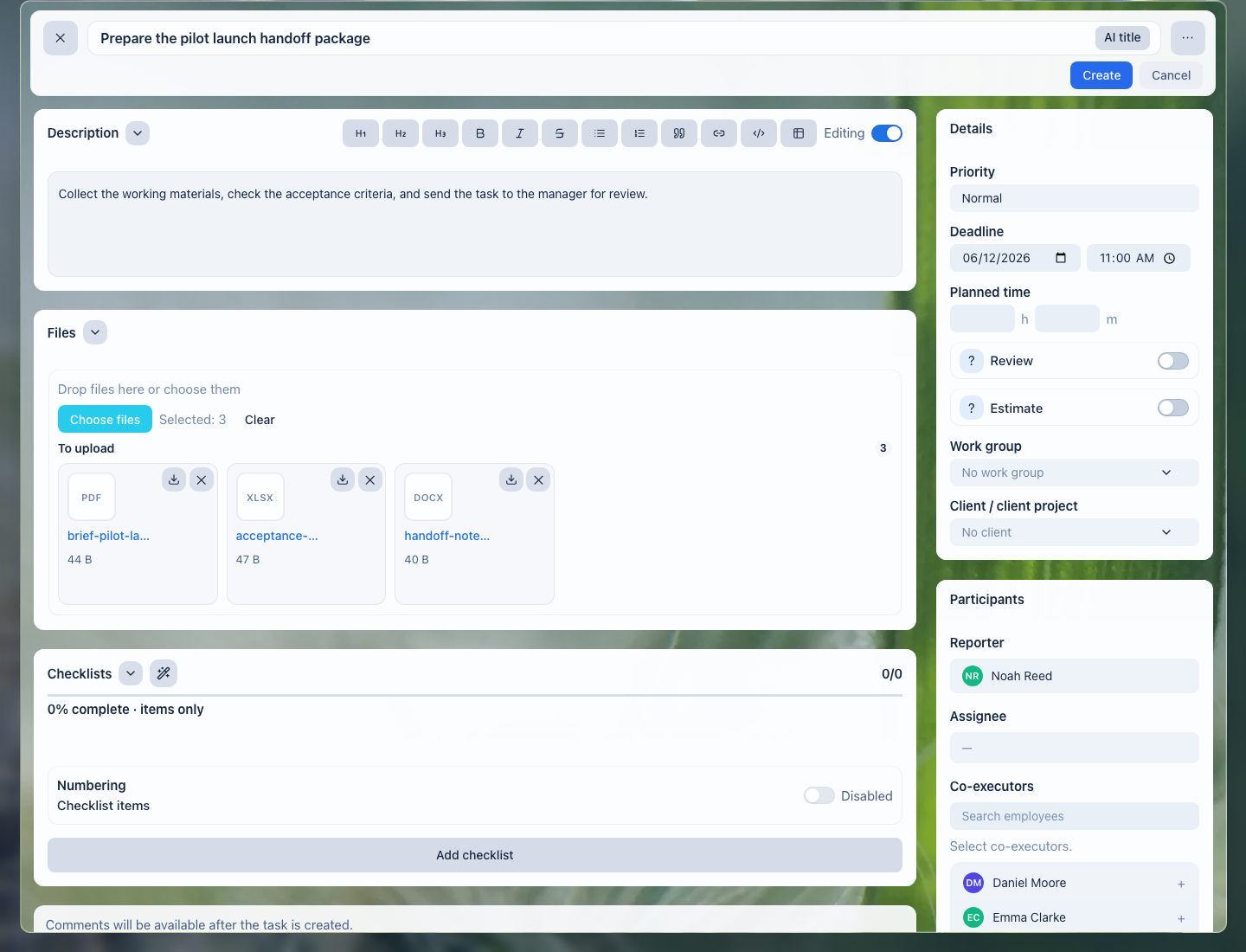
The right version of a contract or claim doesn't get lost in email — matter files are visible right inside the task before it even reaches the assignee.
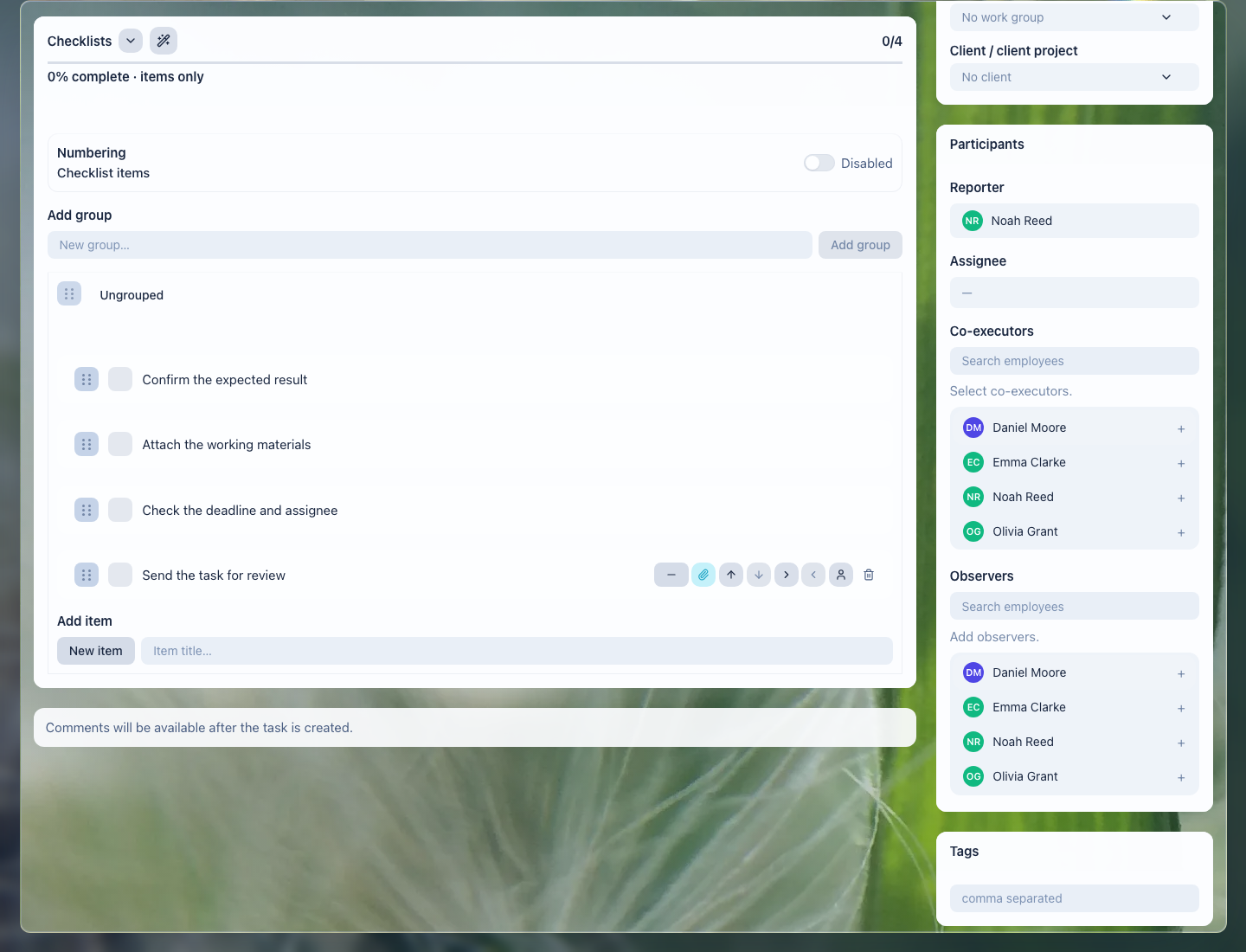
Preparation for a hearing or a filing can be broken into verifiable steps right when the task is created.
Access and confidentiality

This conceptual flow shows access boundaries for sensitive data; it is not a UI screenshot or portal-state evidence.
Legal data is sensitive, so access to clients, matters, and documents is governed by permissions: who can view, who can edit, who can only read. This makes it possible to handle shared matters as a team without opening the whole database to every staff member.
What the firm gets

This conceptual cycle links a matter, work, and a verifiable result; it is not a UI screenshot or portal-state evidence.
- every matter clearly shows its status, the responsible lawyer, deadlines, and documents;
- fewer missed hearings and renewals — deadlines stay under control;
- documents aren't lost and stay linked to the matter;
- the partner sees workload and risks without manual reports;
- access to sensitive data is restricted by permissions.
Implementation checklist

This conceptual lifecycle supports a step-by-step rollout; it is not a UI screenshot or portal-state evidence.
- Create clients (individuals and companies) as single records with history.
- Set up a case pipeline by stage (intake, preparation, handling, closing) with a responsible lawyer.
- Track hearings, deadlines and document preparation as tasks with dates and assignees.
- Attach contracts, claims and files to the case, not to an employee's personal email.
- Configure access rights to sensitive data: who can view, who can edit, who can only read.
- Set up partner oversight: lawyer workload, approaching deadlines and stalled cases.
What to avoid

This conceptual flow shows safe separation of clients, matters, and files; it is not a UI screenshot or portal-state evidence.
- Don't open sensitive cases to the whole team — access rights are mandatory.
- Don't track hearing and filing deadlines in your head or in email — only as tasks with dates.
- Don't keep claims and contracts in an employee's personal email.
- Don't conflate the client and the case: a case is linked to a client, but they are different entities.
How to measure the result

This conceptual flow helps measure how quickly context and documents can be found; it is not a UI screenshot or portal-state evidence.
- the share of matters where procedural deadlines were met;
- lawyers' workload and the number of matters with no movement;
- the time spent finding the right version of a document for a matter;
- the share of sensitive data with access correctly configured.
Where to start
This conceptual cycle shows a safe starting point for linking matters and work; it is not a UI screenshot or portal-state evidence.
- Clients — client records, companies, and contacts.
- Matter stages in CRM — moving a matter through work stages.
- CRM, Task, and Document Links — connect the matter, assignments, files, and documents.
- Tasks — deadlines, hearings, and document preparation.
- Create a Task — record a deadline, hearing, or document-preparation step with an owner and date.
- Task Fields and Work Context — connect the work to the client, matter, document, and expected result.
- Add a Checklist — split hearing or document preparation into verifiable steps.
- Attach Files to a Task — keep contracts, claims, evidence, and final versions next to the work.
- Task Comments — record client clarifications, rework reasons, and matter decisions.
- Task Templates and Automation — repeat standard legal processes without rebuilding them manually.
- Task Lists and Views — control deadlines, client waiting states, and lawyer workload.
- Review and Close a Task — accept legal work without losing a required deadline or file.
- Documents — storing documents linked to the matter.
- CRM errors and limits — access, permissions, and common limitations.
Legal context. Record each incoming request with its receipt date and owner; keep consent acceptance as a versioned record with the date and the exact text accepted. Configure retention by data type and review it operationally instead of applying one blanket period. GDPR can be useful context for questions about purpose, access, and retention, but applicable law depends on the matter. Ask a lawyer to review the wording and workflow before rollout: LadVen OS records operational steps, but it does not guarantee compliance or replace legal advice.
Request a demo
This conceptual flow explains the demo scenario; it is not a UI screenshot or portal-state evidence.
Want to see how clients, matters, and deadlines are managed on a ready demo portal? Request a demo — we'll show you an environment configured for legal work and help you move your matters onto it.
LadVen OS is a young product and we do not hide it: you will see rough edges. What we give in return is that you are not left alone with them. In May we shipped 118 changes; in July, 2,125. There's no quarterly release cycle to wait for.