Veterinary clinic: pet owners, pets, visits, documents, and reminders
This page covers the operating loop of a veterinary clinic: an owner books a pet, the reception team records the request, the team prepares the visit, attaches documents and photos, creates after-visit tasks, and reminds the owner about a follow-up check, vaccination, or owner call. LadVen OS helps manage bookings, tasks, files, deadlines, and communication around the owner and pet, but it does not replace a veterinary clinical system, animal medical record, medical history, diagnoses, prescriptions, lab integrations, or industry registries.
What Problem It Solves

Conceptual scenario flow: process guidance, not a UI screenshot or screenshot evidence.
In a veterinary clinic, the clinical visit is often not the part that gets lost; the surrounding coordination is. An owner writes in a messenger, a situation photo stays on a receptionist's phone, an organizational result sits in email, a follow-up should happen next week, but no reminder is created. The manager notices only when the owner is already waiting for a reply or the visit breaks down.
The scenario solves this by turning bookings, visit preparation, documents, internal assignments, follow-ups, and reminders into tasks with owners, deadlines, files, checklists, and comments. Clinical data stays in the dedicated veterinary system, while LadVen OS handles team coordination and owner communication.
How It Works in LadVen OS

Conceptual scenario flow: process guidance, not a UI screenshot or screenshot evidence.
The scenario is built from existing capabilities:
- Clients and pets — the owner card keeps contacts, request history, linked tasks, and operational pet details.
- CRM and stages — the request moves from booking to preparation, visit, result, and follow-up.
- Calendar — visits, calls, follow-up checks, and working windows are visible in the team's shared schedule.
- Tasks — room preparation, document requests, owner calls, result checks, and follow-up visits get an assignee and deadline.
- Files — consents, instructions, non-sensitive photos, owner documents, and working materials stay next to the task.
- Checklists — visit preparation, document checks, instruction handoff, and follow-up are fixed in advance.
- Comments — receptionist clarifications, operational doctor decisions, and manager notes remain in the history.
- Reminders — follow-up checks, vaccinations, preventive visits, and owner calls become dated tasks.
Visits, Pets, and Team Work

Conceptual scenario flow: process guidance, not a UI screenshot or screenshot evidence.
Every visit needs a clear route: who accepted the owner, which pet is booked, which documents are needed, what must be prepared, who owns the room, who follows up after the visit, and when the next contact is due. A first visit, vaccination, planned procedure, grooming, organizational-result handoff, or follow-up check may each have a different route, but responsibility must stay visible.
If the owner reschedules, the task is updated. If the doctor asks someone to prepare a document or contact the owner after the visit, the assignment is recorded next to the visit. If a follow-up check or vaccination reminder is needed, it does not stay in the receptionist's memory; it becomes a dated task with an assignee.
Visit route and follow-up contact

Conceptual scenario flow: process guidance, not a UI screenshot or screenshot evidence.
The working route starts with the owner's request: a website form, call, or messenger message enters CRM, the receptionist confirms the pet, visit reason, suitable time window, and safe organizational document list. Then a preparation task is created: room, responsible veterinarian, materials, consents, handouts, and readiness deadline. After the visit, the owner records the organizational result: what was handed to the owner, whether a follow-up check is needed, when to remind about vaccination or a preventive visit, who should call back, and by when.
Managers need simple working statuses: new booking, waiting for owner confirmation, documents not ready, visit preparation, pet at the visit, final comment needed, follow-up contact needed, closed. These are not clinical statuses or medical history; they are operational visibility so an owner does not wait without an answer.
Exceptions should also become tasks: owner no-show, rescheduled visit, incomplete documents, handout still not sent, organizational next step needs agreement, veterinarian asks someone to contact the owner, or the repeat-visit reminder is overdue. Then the clinic sees not only the calendar, but also the unresolved work around the owner and pet.
Roles, portal, and automation

Conceptual scenario flow: process guidance, not a UI screenshot or screenshot evidence.
The receptionist owns the incoming request, time confirmation, safe documents, and reminder. The veterinarian sees the visit task, preparation, files, and organizational result, while clinical notes, prescriptions, and diagnoses stay in the dedicated veterinary system. The manager watches the queue, overdue work, unconfirmed visits, missing follow-up, and team load. Documents and finance join only where a consent, agreement, act, or payment needs to be prepared.
The owner portal is useful for status, handouts, organizational documents, and upcoming visits. It should not be described as a veterinary medical record, vaccination card, or portal with diagnoses. Automation should cover operational risks: if the visit is today and documents are not ready, the receptionist gets a task; if the visit ends without a next contact, the manager sees it in a view; if a repeat-visit reminder is overdue, the task stays open until there is a result.
Files, Checklists, and Reminders
Even without a clinical medical record, a veterinary clinic has many operational materials: consents, questionnaires, instructions, owner documents, non-sensitive process photos, internal procedures, and results that need to reach the responsible person. They should not live in private chats; they should sit next to the task where the next step is visible.
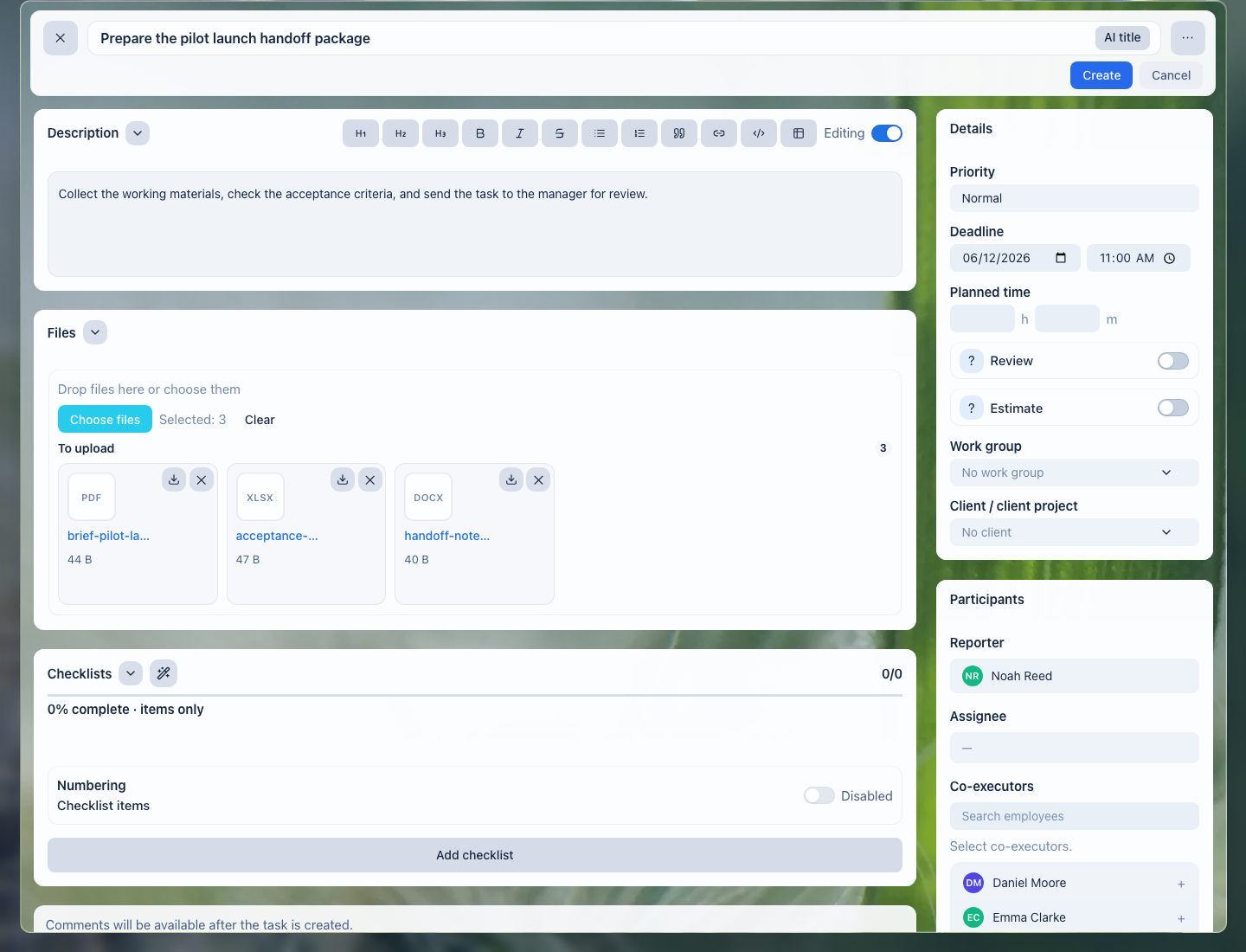
Files stay next to the work: reception, doctor, and manager see one operational material set.
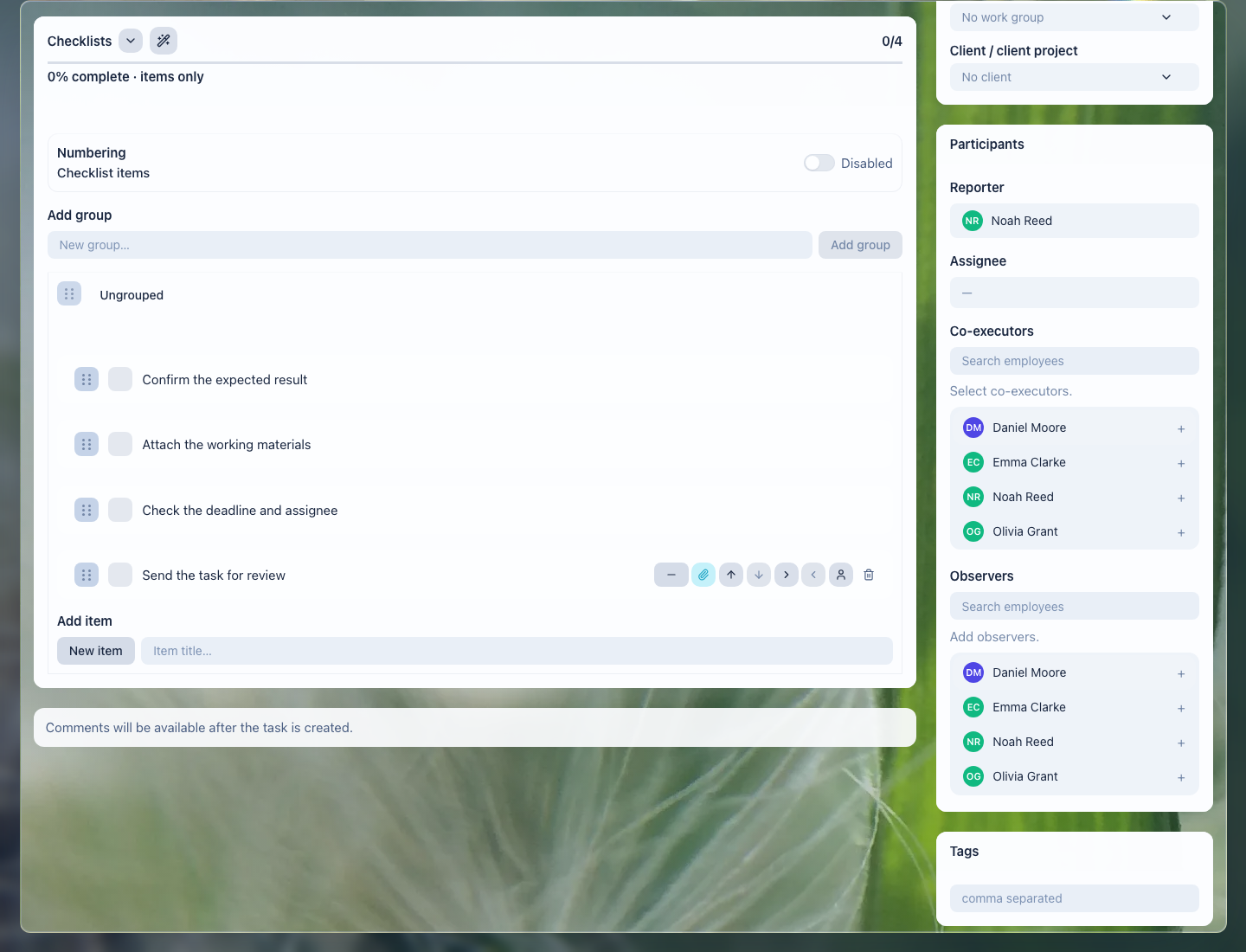
A checklist helps verify documents, preparation, instruction handoff, and the follow-up task.
What the Clinic Gets

Conceptual scenario flow: process guidance, not a UI screenshot or screenshot evidence.
- every visit shows who owns preparation, owner contact, and the next step;
- photos, consents, and instructions do not disappear across phones, email, and chats;
- follow-up checks, vaccination reminders, and owner calls become tasks instead of verbal promises;
- the manager sees overdue work, owner waiting states, and stalled tasks;
- substitution becomes safer because a colleague can see the history, files, and next step without searching chats.
Implementation Checklist

Conceptual scenario flow: process guidance, not a UI screenshot or screenshot evidence.
- Split typical scenarios: first visit, vaccination, planned procedure, organizational-result handoff, follow-up check, owner call.
- Define what can live in LadVen OS and what must stay only in the dedicated veterinary system.
- Create task templates for visit preparation, documents, follow-up, repeat visits, and reminders.
- Add checklists: owner confirmed, documents received, room ready, instructions issued, next contact scheduled.
- Configure manager views: today, tomorrow, waiting for owner, overdue, no follow-up, repeat visits.
- Review access: sensitive data, internal comments, and documents must be visible only to the employees who need them.
What to Avoid
Conceptual scenario flow: process guidance, not a UI screenshot or screenshot evidence.
- Do not use LadVen OS as a replacement for a veterinary medical record, medical history, diagnoses, prescriptions, or lab system.
- Do not store sensitive clinical data in tasks if it belongs in a dedicated veterinary system.
- Do not leave a follow-up check, vaccination reminder, or owner call as a verbal agreement only.
- Do not close visit preparation without a clear result and next step.
- Do not expose owner documents or internal notes to employees who do not need them for work.
How to Measure the Result
Conceptual scenario flow: process guidance, not a UI screenshot or screenshot evidence.
- share of visits prepared before the appointment without urgent clarification;
- number of tasks waiting for the owner, doctor, or receptionist;
- missed follow-up contacts, vaccination reminders, or owner calls;
- time to find the required operational document;
- share of visits where the next step is assigned before the task is closed.
Where to Start
Conceptual scenario flow: process guidance, not a UI screenshot or screenshot evidence.
- CRM clients — keep owner contacts and operational request history.
- Deals and requests — manage booking, preparation, visit, and follow-up stages without losing responsibility.
- CRM pipelines — separate new bookings, preparation, owner waiting states, visits, and follow-ups.
- Intake forms — receive website requests and pass them into CRM without manual copying.
- CRM, tasks, and document links — connect the owner, pet, files, and working tasks.
- Calendar — see visits, calls, and team working windows.
- Create a task — assign visit preparation, a call, or a follow-up with an owner and deadline.
- Task fields and work context — connect the work to an owner, pet, document, and expected result.
- Task checklist — verify preparation, documents, instructions, and the next step.
- Task files — keep operational materials next to the work.
- Task comments — capture clarifications, decisions, and internal notes without losing context.
- Task templates and automation — repeat follow-ups, vaccination reminders, and owner calls without manual task setup.
- Task lists and views — control deadlines, owner waiting states, and workload.
- Review and close a task — accept the operational result without losing the next step.
- Recurring tasks — create vaccination, preventive-visit, and follow-up check reminders.
- CRM robots — trigger standard actions when a request stage changes.
- Task rules — prevent preparation from closing without a result or next contact.
- Documents — keep consents, instructions, and working materials next to the process.
- Extranet client portal — give owners safe access to status and documents where appropriate.
Request a Demo
Conceptual scenario flow: process guidance, not a UI screenshot or screenshot evidence.
Want to see how owner bookings, pets, documents, team tasks, and repeat visits look in a ready demo portal? Request a demo — we will show the scenario on safe demo data and discuss which clinical functions should be developed in early access.