Accounting: client deadlines, documents, and recurring tasks
This scenario is for an accounting firm or an internal finance team: for every client and period, the team needs to see deadlines, owner, document set, current state, and whether the result has been accepted. LadVen OS does not replace a dedicated accounting system, but it keeps work, files, and control in one clear workflow.
What problem it solves
Accounting work usually fails through many small losses: a client sends an act late, an employee forgets to request a missing file, the result is almost ready but has not been reviewed, and the owner sees the risk on the last day. When routine work lives in email, chats, and spreadsheets, each person sees only their own part and the client picture is fragmented.
The scenario solves this by making every period or obligation a task with a date, owner, checklist, and files. Recurring work is created from a template, client documents do not disappear in correspondence, and the manager sees overdue work, workload, and stalled tasks.
How it works in LadVen OS
The scenario is built from existing capabilities:
- Clients and context — a task is linked to a client, period, contract, or internal workstream.
- Recurring tasks — monthly closes, reconciliations, source-document requests, and control dates are created from templates.
- Checklists — document completeness and review steps are fixed before handover.
- Files — acts, statements, registers, extracts, and working notes stay next to the task.
- Comments and acceptance — questions, clarifications, and the manager's decision remain in the task history.
- Lists and control — the manager sees work by client, deadline, owner, and status.
Typical accounting workflows
| Workflow | How to run it in LadVen OS |
|---|---|
| Collecting source documents | Create a task for the period, attach the expected document list, and mark what has arrived and what still needs to be requested from the client. |
| Month or quarter close | Use a template with a checklist: collect documents, check the set, prepare the result, send it for internal acceptance, and hand it to the client. |
| Reconciliation and clarifications | Keep a separate task or linked step so the question, file, client answer, and final decision do not disappear in chat. |
| Urgent request or authority response | Set a short deadline, assign one owner, and fix the final file set before sending. |
Roles and control decisions
Accounting work needs a clear split between preparation, review, and management control. The performer collects and prepares the file set, the manager checks completeness and accepts the result, the business owner watches deadline and workload risk, and the client participates only where documents or clarification are needed.
If the client delays documents, do not silently move the task forward. Leave a comment, mark that the work is waiting for the client, update the deadline, and show it in a manager view. Then the delay reads as a clear external risk rather than as an employee mistake.
Clients, periods, and recurring deadlines
For each client, you can run a repeatable workflow: request documents, check completeness, prepare the result, run internal acceptance, and hand the result to the client. If the work repeats every month or quarter, it is better to use a template with owners, deadlines, and a checklist instead of creating it manually every time.
This is especially useful when one employee manages several clients. The manager sees not only the final state but also the bottleneck: where the client has not sent documents, where the task waits for review, and where a deadline is close.
Documents and acceptance
Files should not live in an employee's private inbox. The task shows which documents are attached, which are still missing, and what clarification was discussed. A checklist keeps routine steps visible: confirm the period, check the set, attach evidence, and send the result for acceptance.
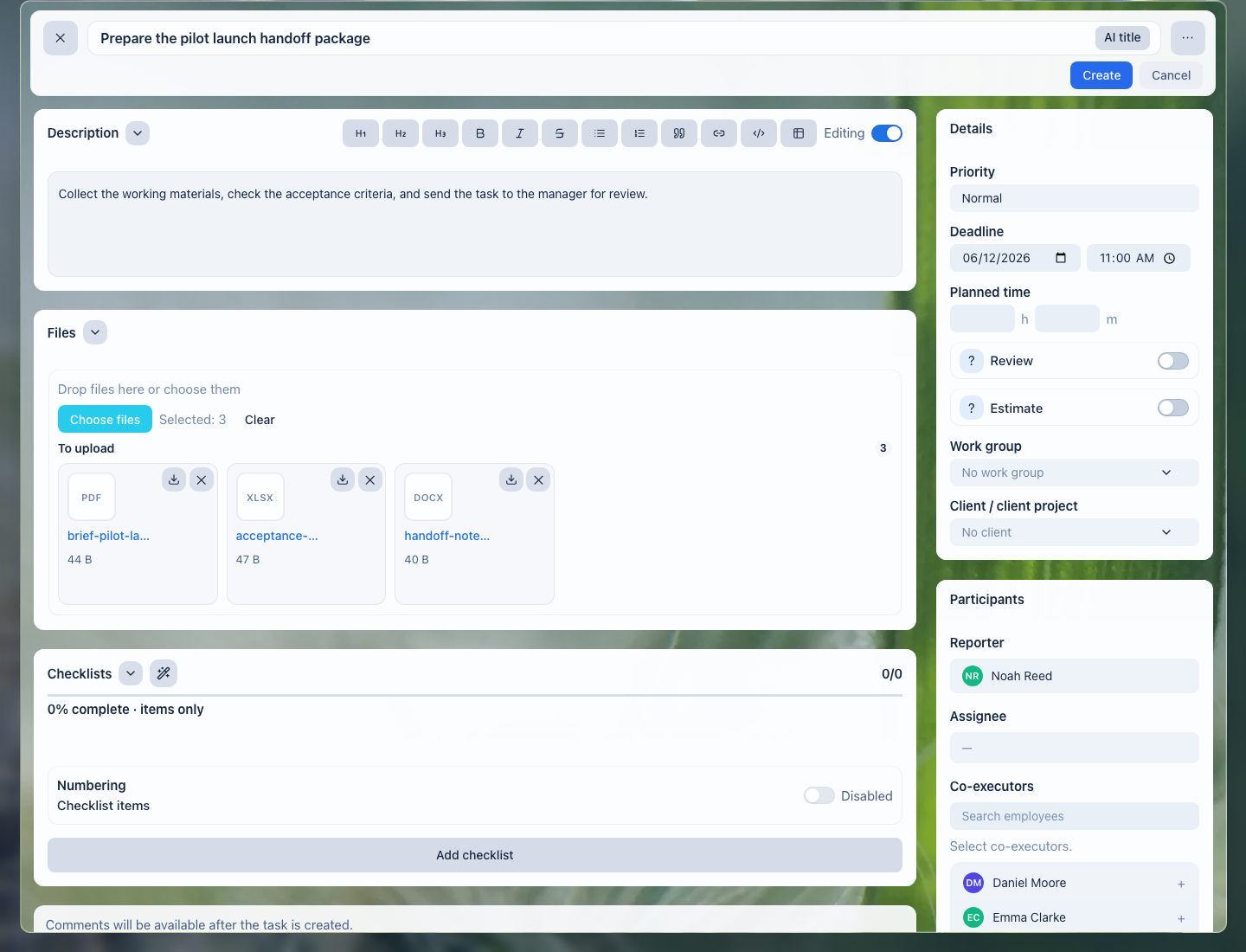
Files stay next to the work: the employee, manager, and backup colleague see the same document set.
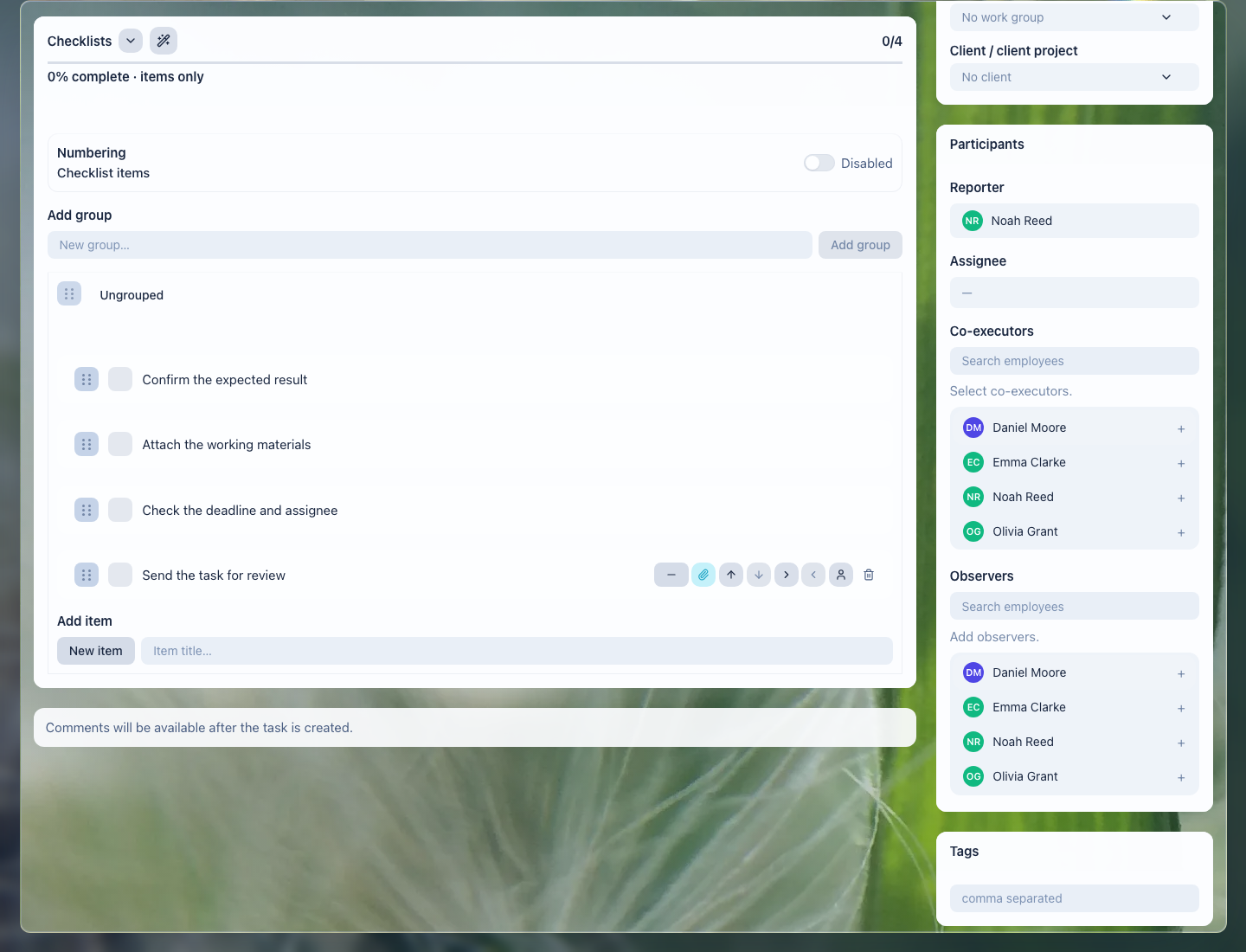
A repeatable process is easier to accept when it is fixed as a checklist: the team knows what must be ready.
What the firm gets
- every client shows current work, owner, and deadline;
- recurring tasks are created from templates instead of memory;
- documents do not get lost between email, chats, and local folders;
- the manager sees overdue work, client waiting time, and stalled tasks;
- result acceptance becomes verifiable through checklist, files, and comments.
Implementation checklist
- Split work by clients and periods: month, quarter, project, or separate obligation.
- Configure task templates for recurring processes: document request, review, preparation, acceptance.
- Add checklists with required steps and acceptance criteria.
- Agree which files are attached to the task and which remain in the accounting system.
- Set up manager views: overdue, waiting for client, under review, no movement.
- Review access rights: financial documents and client data should be visible only to the right employees.
What to avoid
- Do not turn LadVen OS into an accounting engine: specialized calculations and official forms stay in the dedicated product.
- Do not keep source documents only in private email or messenger threads.
- Do not create recurring tasks manually every time once the process is stable.
- Do not close a task without a file, comment, or acceptance mark when the result must be reviewed.
- Do not open financial documents to employees who do not need them for the work.
How to measure the result
- share of tasks closed on time by client and period;
- number of tasks waiting for client documents;
- time from complete document set to accepted result;
- number of overdue and stalled tasks;
- share of tasks with a complete file set and filled checklist.
Where to start
- Create a task — formalize client work with period and deadline.
- Task fields and work context — connect the task to a client, contract, document, and expected result.
- Task checklist — fix the document set and review steps.
- Task files — keep working documents next to the assignment.
- Task comments — keep questions, clarifications, and decisions in history.
- Task templates and automation — repeat regular accounting processes without manual setup.
- Task lists and views — control deadlines, statuses, and owners.
- Time in tasks — estimate workload and actual effort.
- Review and close a task — accept the result without losing a file or required step.
Request a demo
Want to see client deadlines, documents, and recurring accounting tasks on a prepared demo stand? Request a demo — we will show the scenario on safe demo data and help assemble the first pilot workflow.