Agencies: projects, client approvals, and deadlines
This scenario is for agencies that run campaigns, design layouts, websites, content, revisions, and client approvals at the same time. LadVen OS keeps the brief, tasks, files, owners, and decision history in one workflow so work does not split between chats, email, and personal lists.
What problem it solves
In an agency, the issue is often not expertise but context handoff. The client sends a revision in chat, the designer uploads a new version to a private folder, the manager tracks the deadline in a spreadsheet, the developer does not see the final brief, and leadership discovers the risk right before delivery. The result is extra revision loops, disputes about commitments, and constant manual status checks.
The scenario solves this by splitting the project into tasks with owners and deadlines. Materials and versions stay next to the work, revisions are captured in comments, and acceptance is based on a checklist and a visible result.
How it works in LadVen OS
The scenario is built from existing capabilities:
- Projects and clients — work is linked to a client, campaign, website, or internal workstream.
- Tasks and roles — manager, assignee, co-executors, and observers see their responsibility.
- Files — briefs, layouts, copy, exports, and final versions stay next to the task.
- Checklists — preparation, review, and delivery steps are fixed in advance.
- Comments — revisions, questions, and decisions stay in history, not in private chats.
- Lists and control — the manager sees deadlines, stalled tasks, and team workload.
Incoming request and project route
A request can arrive as a brief, a client message, a website lead, a support email, or an internal initiative. The important part is not to leave it in the original channel: the work needs a client, project, result type, owner, deadline, and next step. Then the team understands whether this is a new campaign, a design revision, development, copy, support, or final delivery.
For repeatable flows, it helps to agree on common stages in advance: "brief", "preparation", "internal review", "waiting for client", "revision", and "delivery". If the request comes through CRM or a form, it can be linked with the task and documents so the manager does not have to move context by hand.
Boundaries of client approval
Approval in LadVen OS is an operational record of a decision: which file was reviewed, which revisions were accepted, what should return for rework, and what counts as ready. This helps the team avoid disputes about the latest version and keeps the client's final comment visible.
This scenario does not replace legally binding electronic signature, EDI, specialized proofing for layouts, or a separate contractual acceptance system. If a formal document is required, it should stay in the dedicated system, while the task records the work status, link, file, and next step.
Templates, automation, and leadership control
Agency projects are easier to manage through task templates for common results: campaign launch, landing page, layout, copy, website revision, monthly report, or client support. A template can define roles, checklist, required files, and acceptance criteria in advance.
Leadership needs separate views: "waiting for client", "under internal review", "missing file", "overdue", and "no movement". Automation rules can remind the owner about a deadline, escalate a task to the manager, or create a recurring stage, but the quality decision remains with the team.
Projects, revisions, and client approvals
Every piece of work needs one clear route: what is being done, who owns it, where source materials live, which version is delivered, and who accepts the result. A campaign can follow "brief → material preparation → internal review → client revisions → final delivery". Development can follow "task → layout → implementation → test → acceptance".
This route reduces ambiguity: if a client or manager returns work for revision, the reason is captured in a comment, the file remains attached to the task, and the next step is visible to the owner.
Files, checklists, and acceptance
Agency work almost always depends on materials: brief, layout, copy, spreadsheet, test-page link, or final export. If those materials spread across chats, the team loses time finding the current version. In LadVen OS, the file, discussion, and readiness criteria stay in the task.
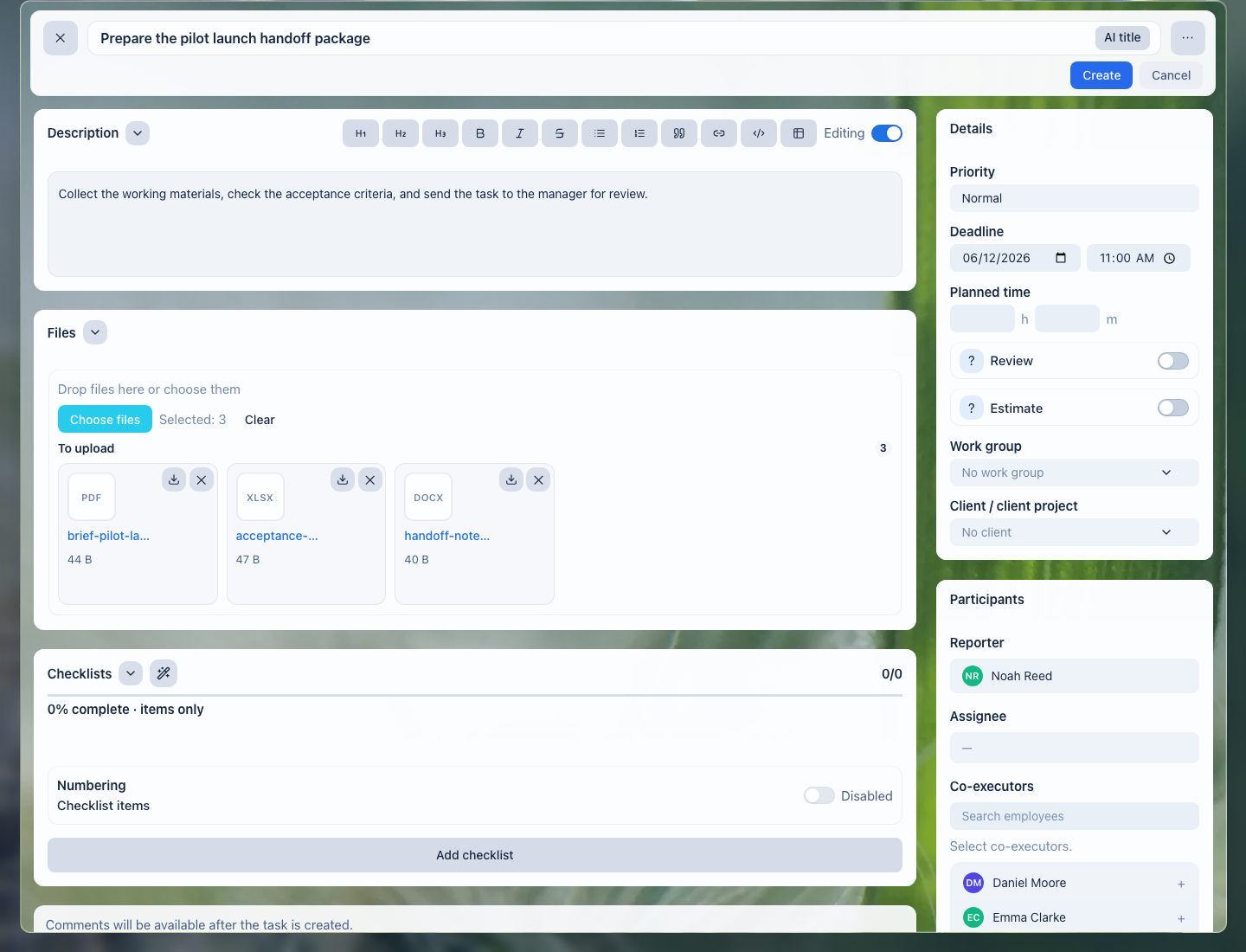
Files stay next to the task: the manager, assignee, and backup colleague see the same material set.
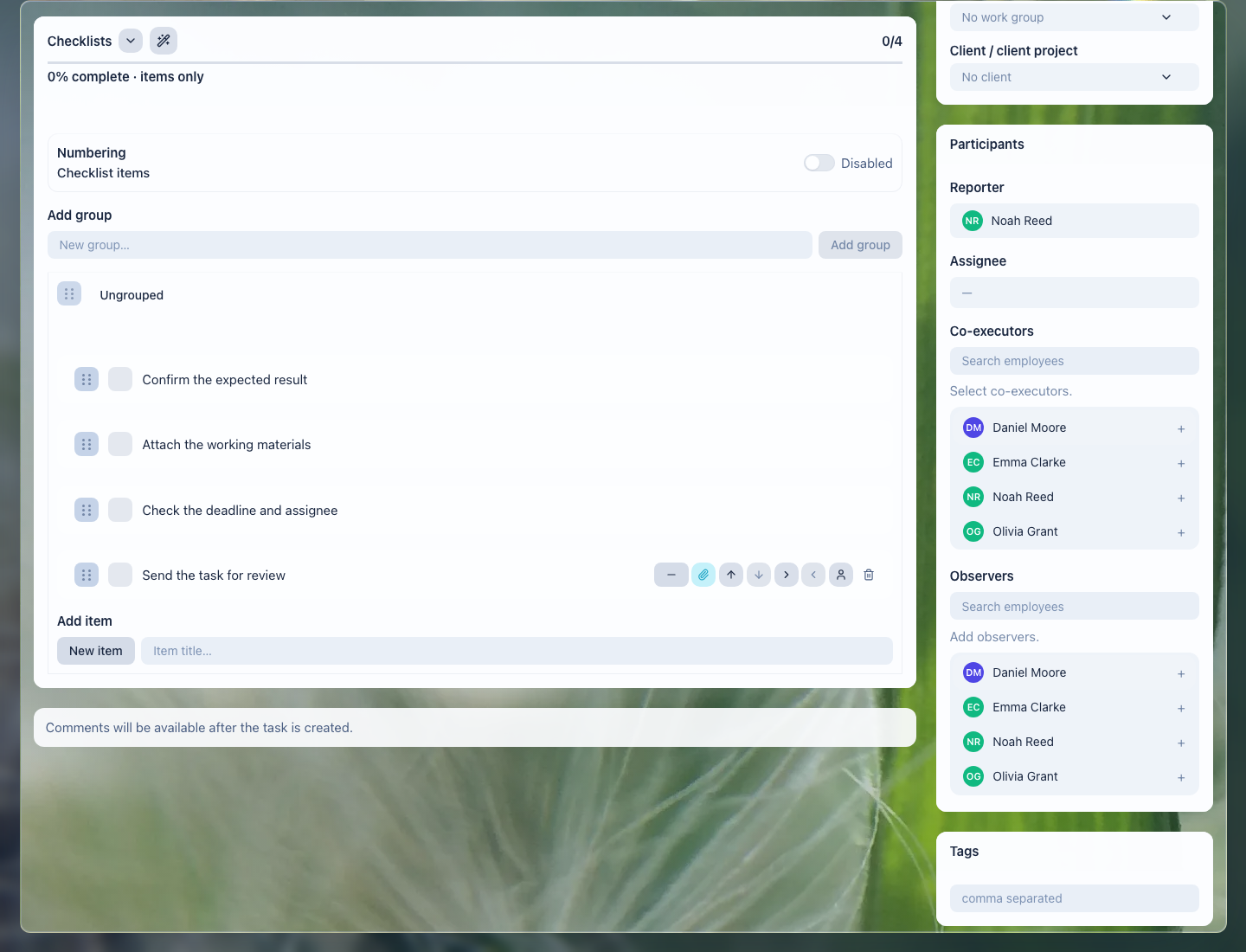
A checklist helps agree in advance what counts as ready: version, review, files, comment, and acceptance.
What the agency gets
- every project shows current work, owner, and deadline;
- client revisions and decisions do not disappear in private chats;
- current files stay next to the task and result;
- leadership sees stalled tasks, overload, and deadline risks;
- acceptance becomes transparent: file, checklist, comments, and change history.
Implementation checklist
- Split work by client, project, and result type: campaign, design, website, copy, support.
- Configure common tasks for repeatable stages: brief, preparation, internal review, client revisions, delivery.
- Add readiness checklists for each result type.
- Agree where the current file version lives and how it is attached to the task.
- Set up manager views: overdue, waiting for client, under review, no movement.
- Review access: client materials, contracts, and internal comments should be visible only to the right participants.
What to avoid
- Do not accept revisions only in a messenger: the final decision should be in the task.
- Do not keep final versions in private folders without a task link.
- Do not close a task without a result, file, or delivery comment.
- Do not mix internal team notes and client messages without access control.
- Do not track deadlines only in the manager's head or a separate spreadsheet.
How to measure the result
- share of tasks closed on time by project and client;
- number of tasks waiting for the client or internal review;
- number of returns caused by incomplete results;
- time spent finding the current file or revision decision;
- number of projects stalled beyond the chosen threshold.
Where to start
- Create a task — formalize a brief, revision, or project stage with owner and deadline.
- Task fields and work context — connect the work to a client, project, document, and expected result.
- Task checklist — define readiness criteria for a layout, copy, website, or campaign.
- Task files — keep briefs, layouts, exports, and final versions next to the work.
- Task comments — capture revisions, questions, and decisions.
- Task relations — connect project stages, client request, and final delivery.
- Task lists and views — control deadlines, statuses, and owners.
- Review and close a task — accept agency work without losing a file or readiness criterion.
Request a demo
Want to see agency projects, client revisions, and files on a prepared demo portal? Request a demo — we will show the scenario on safe demo data and help assemble the first project workflow.