Notary office: clients, documents, appointments, and deadlines
This page describes the working loop of a notary office: client requests, document preparation, appointments, checks, approvals, and deadline control. LadVen OS does not replace notary registers, identity verification, or legally significant notarial actions. It helps organize the work around the request in one place: who owns it, which documents are received, what still needs to be requested, when the appointment is, and what counts as a ready result.
What problem it solves
In notary work, the legal part is often not what gets lost; the operating context does. The client sends part of the documents in a messenger, an assistant clarifies a missing certificate by phone, a draft agreement sits in a private folder, the appointment is recorded elsewhere, and leadership sees the risk only when the client arrives without the required document.
The scenario solves this by turning each request into a task or task chain: files and comments stay next to the assignment, the checklist shows package readiness, and the manager sees overdue work, client waiting states, and tasks without movement.
How it works in LadVen OS
The scenario is assembled from already documented capabilities:
- Clients and requests — the client card keeps contacts, history, and linked tasks.
- Tasks — document preparation, data requests, internal checks, and appointments get an owner and deadline.
- Files — scans, drafts, statements, and final versions stay next to the task.
- Checklists — package content, checks, and preparation steps are agreed in advance.
- Comments — client clarifications, internal decisions, and return reasons remain in history.
- Lists and control — leadership sees tasks due before appointments, waiting for the client, and overdue assignments.
Typical notary workflows
| Workflow | How to manage it in LadVen OS |
|---|---|
| Power of attorney preparation | Create a task with the client, deadline, required data list, and readiness checklist before the appointment. |
| Inheritance request | Track separate steps for document requests, package review, internal clarifications, and result preparation. |
| Transaction or corporate document | Split draft preparation, package completeness review, appointment coordination, and the final comment after reception. |
| Repeat client request | Link the new assignment with the original request so document history, decisions, and previous questions stay visible. |
Roles and appointment readiness
In a notary workflow, organizational preparation must stay separate from legally significant actions. The assistant collects documents and runs the task, the notary reviews the package and makes the professional decision, leadership sees deadline risks, and the client participates in the steps where documents or clarifications are needed.
Before the appointment, the task should answer simple questions: is the package complete, who reviewed the documents, what is still expected from the client, which file or draft is current, and who owns the next step. If the package is incomplete, it is better to mark waiting for client and move the deadline explicitly than to promise readiness without a checked checklist.
Requests, documents, and appointments
Every request needs a clear route: who accepted it, which documents are already present, what still needs to be requested, who checks the package, when the appointment is, and what result must be ready. The package differs for inheritance, powers of attorney, transactions, or corporate documents, but the principle is the same: work should not live in an assistant's memory or a separate chat.
When the client brings a missing document, the task is updated. When a document needs to be requested again, the comment and deadline make that visible. When preparation is returned for rework, the reason stays in the history instead of an oral agreement.
Files, checklists, and acceptance
Notary work depends on a document package. It is important not only to attach files, but also to see clearly which documents are received, which are checked, and which are still needed before the appointment or final preparation.
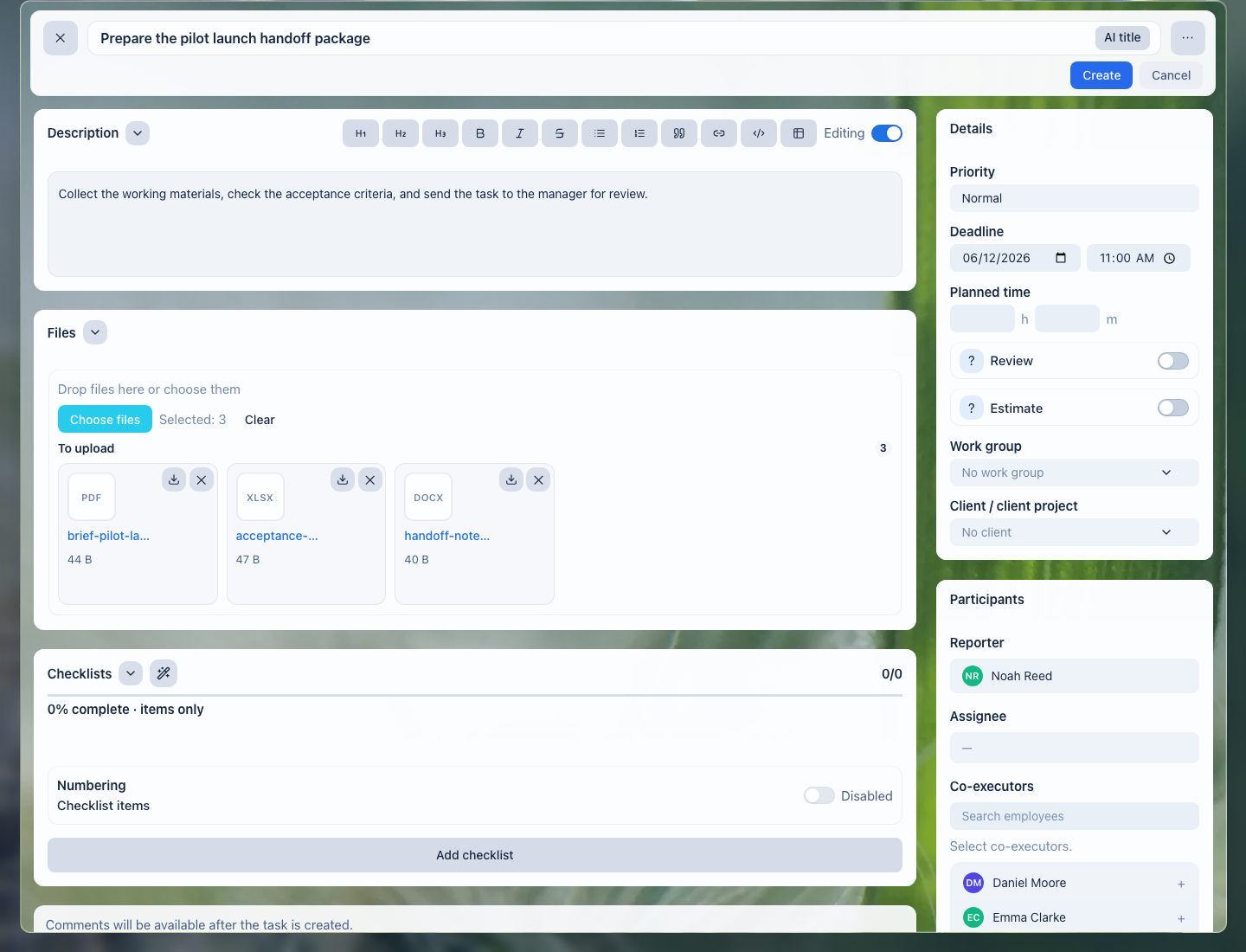
Files stay next to the task: the assistant, notary, and substitute colleague see the same material set.
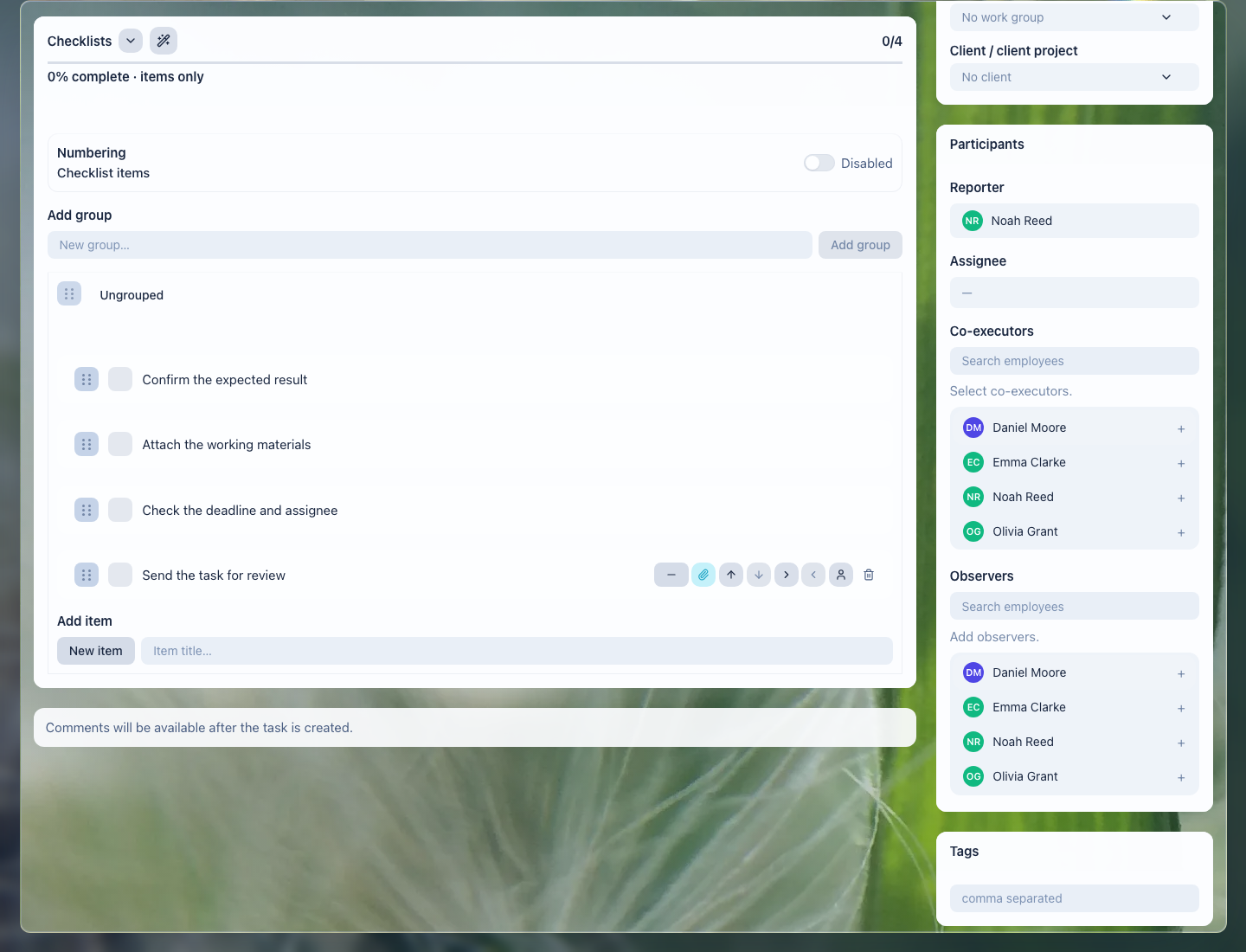
The checklist helps verify the package, internal review, appointment, and final comment before completion.
What the notary office gets
- every request shows who owns it and what is still not ready;
- documents are not lost between email, messengers, and private folders;
- appointments are prepared by checklist, not by memory;
- leadership sees client waiting states, overdue work, and stalled requests;
- substitution becomes safer because the new owner sees files, comments, and decision history.
Implementation checklist
- Separate common request types: powers of attorney, inheritance, transactions, corporate documents, certified copies.
- Define the minimum document package and checks for each request type.
- Create task templates for preparation, missing-document requests, review, and appointments.
- Agree how files are named and where the current version is stored.
- Configure manager views: due for appointment, waiting for client, in review, overdue, no movement.
- Check access: client documents and internal comments should be visible only to the right employees.
What to avoid
- Do not keep the missing-document list only in a chat.
- Do not close preparation without a file, result, or next-step comment.
- Do not mix client documents and internal notes without access control.
- Do not promise readiness until the package checklist has been checked.
- Do not use LadVen OS as a replacement for a notary register or a legally significant notarial action.
How to measure the result
- share of requests ready for the appointment without repeated document requests;
- number of tasks waiting for the client or internal review;
- number of appointment reschedules caused by an incomplete package;
- time needed to find the current file or decision for a request;
- number of requests with no movement beyond the selected threshold.
Where to start
- CRM clients — keep contacts and request history.
- Deals and requests — manage preparation stages without losing ownership.
- Create a task — set up document preparation, a request, or an appointment with owner and deadline.
- Task fields and work context — connect the assignment to the client, document, and expected result.
- Task checklist — verify the document package and appointment readiness.
- Task files — keep scans, drafts, and final versions next to the work.
- Task comments — record clarifications, returns, and decisions.
- Task lists and views — control deadlines, client waiting states, and workload.
- Review and close a task — accept the result without losing a file or readiness criterion.
Request a demo
Want to see notary requests, documents, appointments, and tasks on a prepared demo portal? Request a demo — we will show the scenario on safe demo data and help assemble the first request workflow.