Construction: sites, work, documents, and approvals
This page covers the operating loop of a construction company, renovation team, or contractor: a client leaves a request, the team records the site and stage, prepares documents, assigns tasks to the site supervisor and subcontractors, collects photos, controls deadlines, and closes the work with a result. LadVen OS helps manage sites, tasks, files, deadlines, approvals, and client communication, but it does not replace a dedicated estimating system, quantity takeoff tool, or BIM/CAD coordination platform as specialized industry tools.
What problem it solves
In construction, the work on site is not the only thing that gets lost; the surrounding coordination gets lost too. A request arrives in chat, a drawing stays in email, site photos remain on a supervisor's phone, an act is approved verbally, a subcontractor waits for clarification, and the manager sees the problem only after the deadline is already at risk.
The scenario solves this by treating each site, work stage, document set, checklist, photo, client decision, and next action as one managed process with owners, deadlines, and history. The manager sees where a site visit is needed, where the team is waiting for the client, where a file is missing, where a subcontractor is late, and where the work cannot be closed without acceptance.
How it is structured in LadVen OS
The scenario is assembled from already documented capabilities:
- Clients and sites — the client card stores contacts, request history, related tasks, documents, and agreements.
- CRM and stages — the request moves from first contact to site visit, preparation, work, acceptance, and follow-up.
- Tasks — site visit, measurement, document preparation, procurement, site work, approval, photo report, and closure each get an owner and deadline.
- Files — contracts, acts, drawings, photos, instructions, reports, and working materials stay next to the task.
- Checklists — site preparation, materials, safety, photo proof, acceptance, and defects are checked in advance.
- Comments — client decisions, supervisor questions, subcontractor answers, and internal risks remain in history.
- Calendar and reminders — site visits, inspections, acceptance, warranty follow-up, and repeat work become dated tasks.
Site, stage, and responsibility
Every job needs a clear route: who accepted the request, which site and address are involved, which stage is being done, who owns documents, who coordinates subcontractors, which files are needed, when the control point happens, and what counts as done. Renovation, installation, finishing, engineering work, maintenance, or warranty visits may have different steps, but responsibility must be visible.
If the client changes a decision, a subcontractor delays an answer, or a defect appears on site, it is recorded in the task. If a repeat visit or warranty check is needed, it does not stay in the site supervisor's memory; it becomes a task with a date and owner.
Site route and control points
A construction scenario works better as a site route than as a generic task list: request, first contact, site visit or measurement, offer handoff, work start, photo report, acceptance, defect closure, and warranty follow-up. At every step, the team should know who currently owns the work and what blocks the next move.
Managers need separate working views: waiting for client, waiting for subcontractor, missing document, missing photo report, ready for acceptance, defects open, warranty contact needed. These views separate a normal delay from lost ownership: a subcontractor waiting for clarification is one task; the office missing an act is another; a client not yet accepting the result is a separate waiting state.
Internal defects and client-facing acceptance should stay separated. The team can discuss risks, unfinished work, and materials inside the task, while the client sees only approved documents, status, and result where client access is enabled. In this setup LadVen OS stays the operating loop for construction work, while estimates, quantity takeoff, and BIM/CAD remain a separate calculation loop or an early-access topic.
Files, checklists, and acceptance
A construction team needs the contract, act, drawing, photo, materials list, defects, correspondence, and final report next to the work. When materials are scattered across chats, it is hard to know which version is current, what the client already approved, and why work returned for correction.
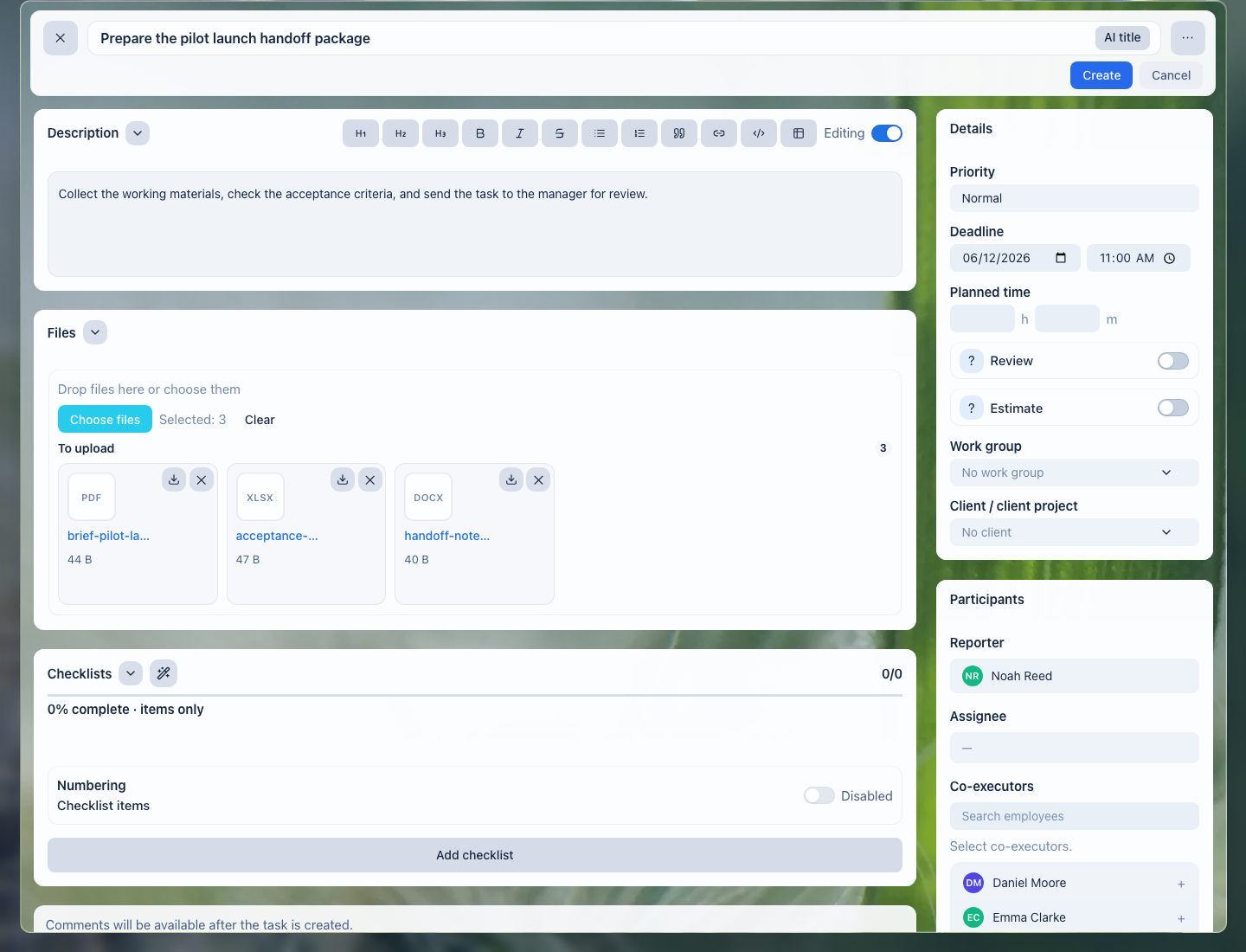
Files stay next to the site: the manager, site supervisor, subcontractor, and office see one material set.
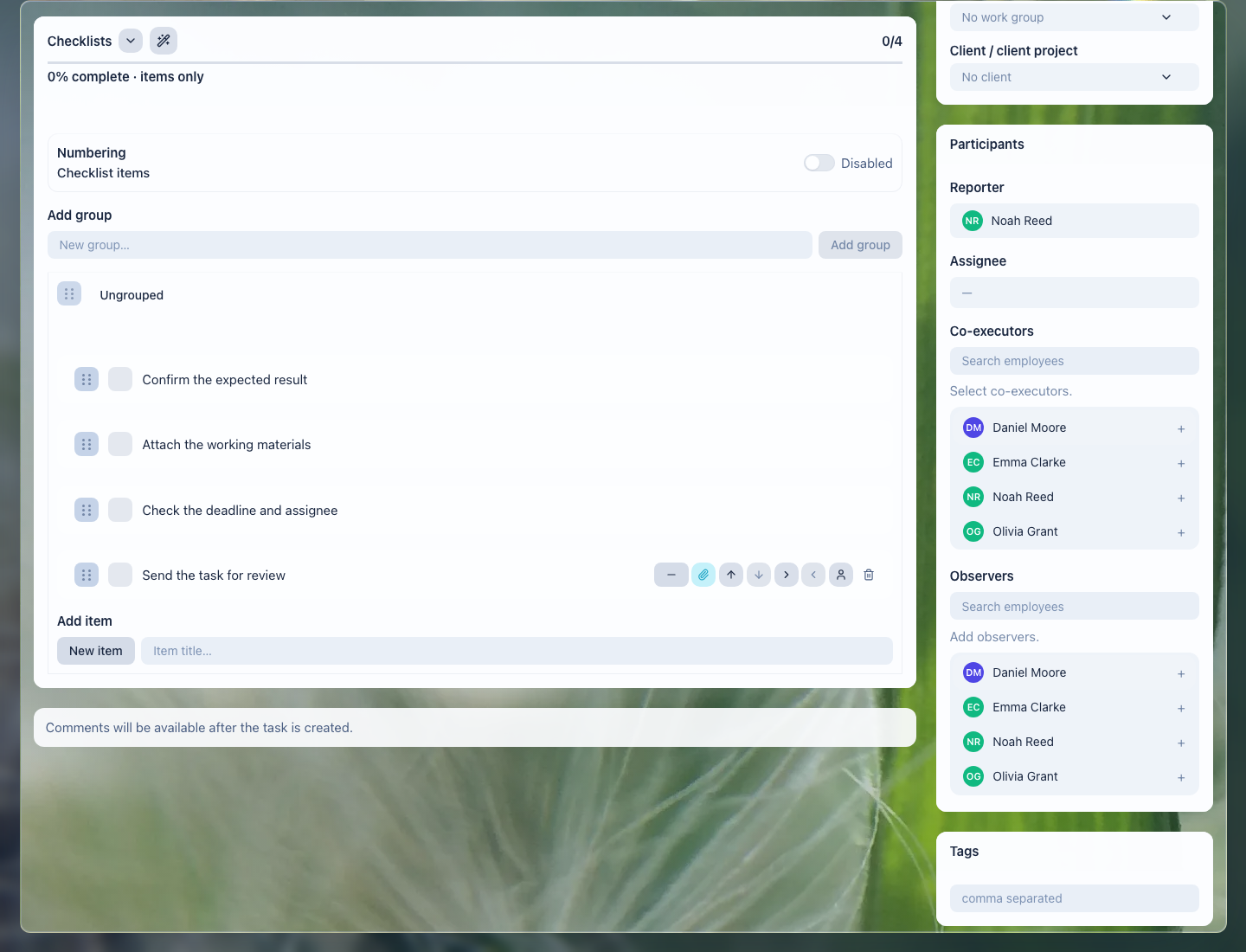
The checklist helps avoid missing preparation, documents, control photos, acceptance, and defect closure.
What the team gets
- every site shows who owns the stage, documents, subcontractors, and next step;
- files, photos, and approvals do not disappear between email, phones, and private chats;
- the manager sees overdue work, stuck approvals, client waiting, and team load;
- acceptance does not depend on verbal memory: result, files, and defects stay in the task;
- repeat visits, warranty checks, and document control can be planned in advance.
Implementation checklist
- Separate common flows: new request, site visit, preparation, procurement, site work, acceptance, defects, warranty follow-up.
- Define site fields: client, address, work type, stage, owner, subcontractor, documents, deadline, next contact.
- Create task templates for site visits, document preparation, work, photo reports, acceptance, and defect closure.
- Add checklists: site prepared, materials checked, documents attached, photos captured, client approved, result accepted.
- Configure manager views: new requests, today, waiting for client, waiting for subcontractor, missing documents, missing photos, overdue.
- Decide separately where estimates, quantities, and BIM/CAD are managed: LadVen OS can manage tasks, files, approvals, and communication, while industry calculations may require a separate system or early access.
What to avoid
- Do not present a dedicated estimating system, quantity takeoff, or BIM/CAD coordination as ready parts of the scenario.
- Do not use a task time estimate as a replacement for a construction cost estimate or bill of quantities.
- Do not keep drawings, acts, and photos only in private chats of site supervisors and subcontractors.
- Do not close work without a result, files, acceptance, or clear next step.
- Do not mix internal defects and client-facing materials without access control.
How to measure the result
- share of sites where the next step is assigned before the end of the workday;
- number of jobs waiting for the client, subcontractor, document, or internal decision;
- overdue control points and open defects;
- average time from request to site visit and from completed work to acceptance;
- share of jobs with a complete file set, photos, and final comment.
Where to start
- CRM clients — store contacts, request history, sites, and agreements.
- Deals and requests — manage request stages from first contact to work acceptance.
- CRM pipelines — separate new requests, site visits, preparation, work, and acceptance.
- Inbound request forms — receive website requests into CRM without manual copying.
- CRM, task, and document links — connect the client, site, files, and work tasks.
- Create a task — assign a site visit, document preparation, work, or photo report.
- Task fields and work context — record site, stage, risk, deadline, and next step.
- Task files — keep contracts, acts, drawings, photos, and reports next to the work.
- Task checklist — check preparation, materials, photo proof, acceptance, and defects.
- Task comments — record client decisions, subcontractor questions, and work result.
- Task lists and views — control deadlines, waiting states, and team load.
- Review and close a task — accept the result, files, photos, and next contact.
- Calendar — see site visits, inspections, acceptance dates, and work windows.
- Recurring tasks — schedule regular checks, warranty follow-ups, and document control.
- CRM robots — launch standard actions when a request stage changes.
- Task rules — prevent closure without a final comment or file.
- Documents — keep contracts, acts, and working materials next to the process.
- Disk and files — keep large materials and document versions in a clear structure.
- Extranet client portal — give the client safe access to status and documents where needed.
Request a demo
Want to see how construction sites, tasks, documents, photos, acceptance, and defects look on a ready demo portal? Request a demo — we will show the scenario on safe demo data and discuss whether you need early access for estimating, quantity takeoff, or BIM/CAD coordination.