Logistics: requests, shipments, documents, and deadline control
This page covers the operating loop of a logistics team: a client leaves a request, the manager records the shipment and route, the team collects documents, agrees terms, controls deadlines, shares statuses with the client, and closes the shipment with a result. LadVen OS helps manage requests, tasks, files, deadlines, communication, and client context, but it does not replace automatic cargo tracking, carrier integrations, or route optimization as specialized industry tools.
What problem it solves
In logistics, the shipment itself is not the only place where work breaks down. A request arrives in a messenger, documents stay in email, pickup deadlines live in a spreadsheet, rate approval remains in a private chat, and the client asks several people for the status.
The scenario solves this by treating each shipment as managed work with an owner, deadlines, files, comments, checklists, and a next action. The manager sees where a request is new, where documents are being prepared, where the carrier is expected, where the client must answer, and where escalation is needed.
How it works in LadVen OS
The scenario is assembled from existing capabilities:
- Clients and requests — the client card keeps contacts, request history, related tasks, and agreements.
- CRM and stages — the request moves from new inquiry to estimate, approval, document preparation, shipment, and closure.
- Tasks — estimate, document request, terms check, client call, status control, and closing each get an owner and deadline.
- Files — requests, waybills, acts, instructions, photos, correspondence, and working materials stay next to the task.
- Checklists — request intake, cargo check, documents, approval, deadline control, and shipment result are checked in advance.
- Comments — client decisions, manager clarifications, and internal risks stay in the history.
- Reminders — pickup, arrival, document, or repeat-request control becomes a dated task.
Request, cargo, and responsibility
Every shipment needs a clear work route: who accepted the client, what is being shipped, from where to where, what documents are needed, who agrees the terms, who controls the deadline, who updates the client, and what counts as completion. City delivery, intercity shipment, international shipping, consolidated cargo, and regular-client work may have different steps, but responsibility must stay visible.
If a deadline, rate, address, or document set changes, the task is updated. If the carrier or client delays an answer, the next step appears. If a repeat shipment is needed, the control does not stay in a manager's memory; it becomes a task or template.
Shipment route and exceptions
Logistics work is clearer when it follows a shipment route: request, parameter clarification, calculation and terms, document collection, pickup confirmation, checkpoint control, delivery confirmation, closing documents, and repeat request. At every step, the team should see who owns movement now and what blocks the next action.
Even without automatic tracking, the team can keep a useful client status manually: documents received, waiting for client, waiting for carrier, pickup confirmed, in transit according to carrier information, escalation needed, delivered, waiting for closing documents. This status does not replace GPS/API integration, but it gives managers and leadership one working context for client replies.
Exceptions should also be explicit: a consignment note or instruction is missing, the carrier changes the pickup window, the client changes address or time, cargo is held until a document decision, or delivery result must be confirmed by photo or act. Each exception should create a task with an owner, date, file, or comment instead of an oral agreement in a private chat.
Files, checklists, and client statuses
A logistics team needs the request, documents, instructions, approvals, photos, internal notes, and final materials close to the work. When they sit in different chats, the team loses the current version and starts arguing about who promised what to the client.
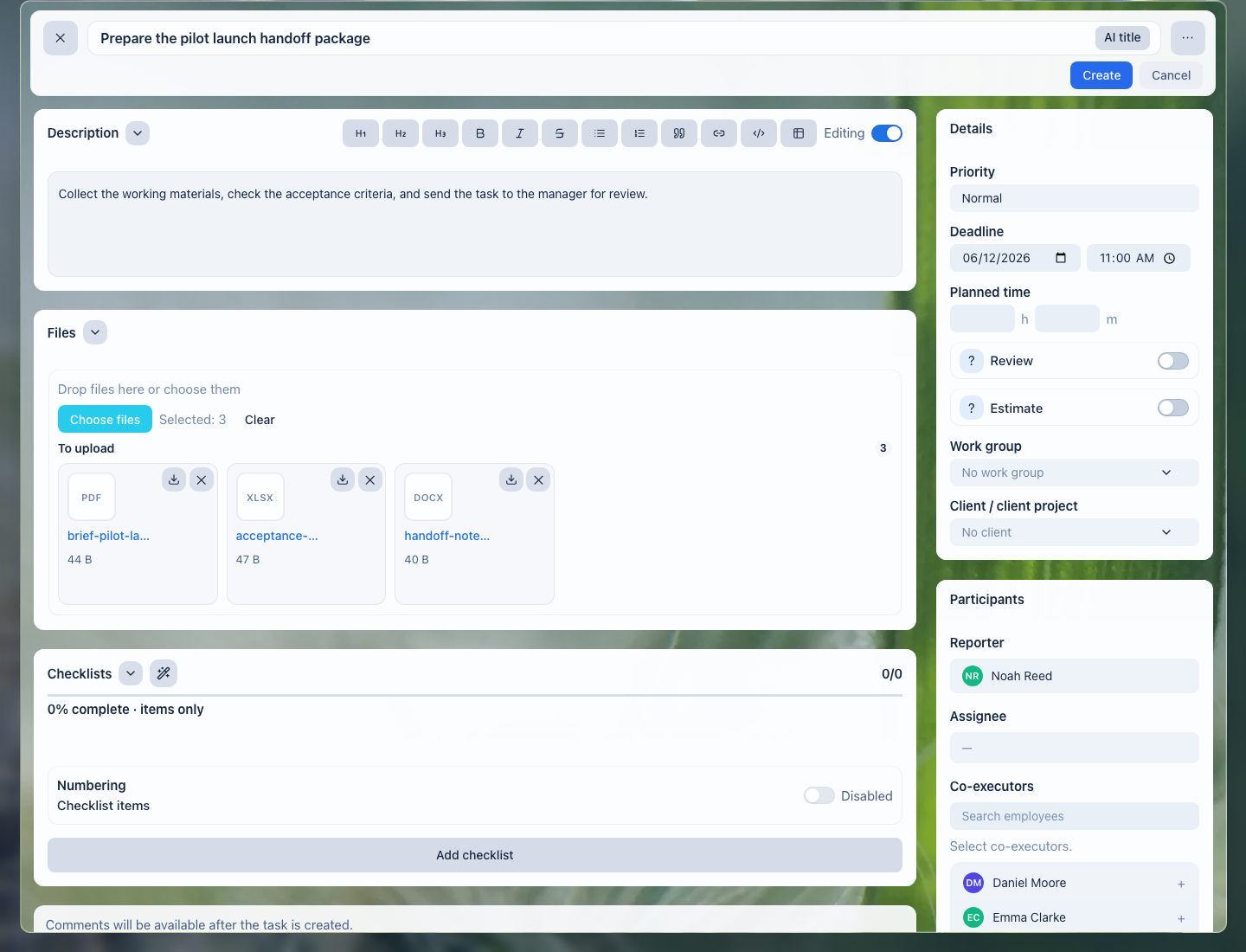
Files stay next to the task: the manager, lead, and process participants see one shared set of materials.
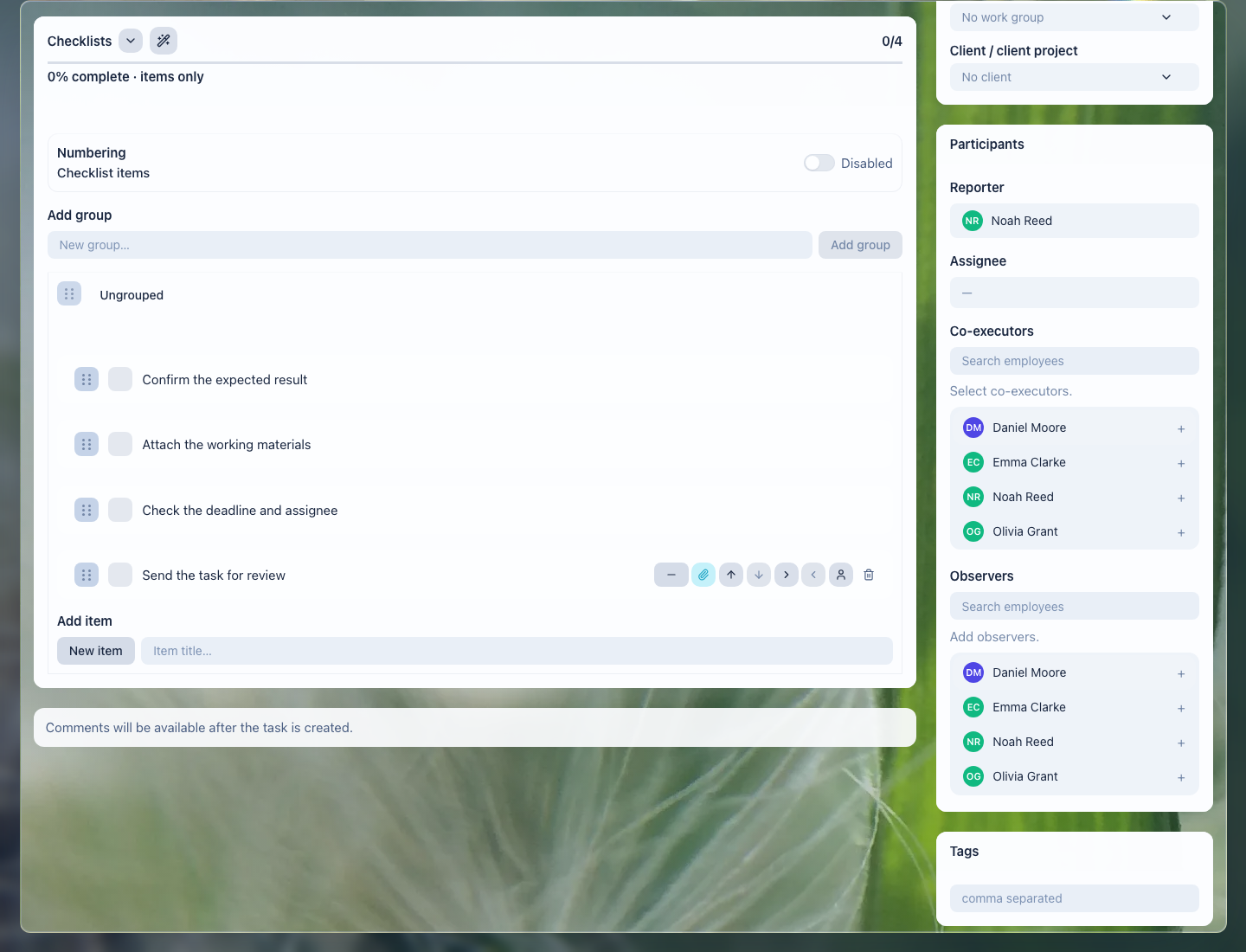
The checklist helps avoid missing documents, approvals, control points, and shipment closure.
What the team gets
- every request shows who owns the estimate, documents, status, and next step;
- documents and approvals do not disappear between email, spreadsheets, and private chats;
- client statuses are sent from one work context, not from a manager's memory;
- the manager sees stalled requests, overdue work, client waiting states, and team load;
- repeat shipments and document control no longer depend on manual reminders.
Implementation checklist
- Separate common flows: new request, estimate, document collection, approval, shipment, closure, repeat request.
- Define request fields: client, cargo, route, deadline, owner, documents, status, next contact.
- Create task templates for estimate, document request, approval, control call, and closure.
- Add checklists: request accepted, parameters clarified, documents received, terms approved, status sent, result closed.
- Set up manager views: new requests, today, waiting for client, waiting for carrier, documents not ready, overdue.
- Decide separately where automatic tracking, carrier integrations, and route optimization live: LadVen OS can manage requests, tasks, documents, manual statuses, and communication, while industry tracking may require another service or early access.
What to avoid
- Do not present automatic cargo tracking, carrier integrations, or route optimization as ready parts of the scenario.
- Do not keep documents and approvals only in managers' private chats.
- Do not close a shipment without a result, final comment, and next step.
- Do not mix internal risks and client-facing messages without access control.
- Do not use manual task status as a replacement for automatic vehicle monitoring or inventory accounting.
How to measure the result
- share of requests where the next step is assigned before the end of the workday;
- number of shipments waiting for the client, documents, carrier, or internal decision;
- number of overdue control points;
- average time from request to estimate and from approval to closure;
- share of shipments with a full file set and final comment.
Where to start
- CRM clients — keep contacts, request history, and agreements.
- Deals and requests — manage request stages from inquiry to shipment closure.
- CRM pipelines — separate new requests, estimates, approvals, documents, and shipments.
- Inbound request forms — receive website requests and pass them to CRM without manual copying.
- CRM, task, and document links — connect the client, shipment, files, and work tasks.
- Create a task — assign an estimate, document request, call, or status control.
- Task fields and work context — record route, cargo, deadline, risk, and next step.
- Task files — keep requests, waybills, acts, and instructions next to the work.
- Task checklist — check documents, approvals, control points, and closure.
- Task comments — record client decisions, internal risks, and shipment result.
- Task templates and automation — repeat standard stages and reminders without manual assembly.
- Task lists and views — control deadlines, waiting states, and team load.
- Review and close a task — accept the result, files, and next contact.
- Calendar — see control dates, calls, and work windows.
- Recurring tasks — schedule regular document and repeat-request checks.
- CRM robots — trigger standard actions when a request stage changes.
- Task rules — prevent closing work without a final comment or file.
- Documents — keep contracts, acts, and working materials next to the process.
- Extranet client portal — give clients secure access to status and documents where needed.
Request a demo
Want to see how logistics requests, shipments, documents, deadlines, and statuses look in a ready demo portal? Request a demo — we will show the scenario on safe demo data and discuss whether early access to cargo tracking or carrier integrations is relevant for you.